Stable Diffusion in short
Stable Diffusion is an open-source latent diffusion model (LDM): a neural network trained to turn random noise into a picture, a little at a time, steered by a text. It was built by the CompVis group at Ludwig Maximilian University of Munich with Runway, and trained with computing power from Stability AI on images collected by the LAION non-profit. The method comes from the paper High-Resolution Image Synthesis with Latent Diffusion Models (Rombach and colleagues, CVPR 2022).
The weights were published on 22 August 2022. That is the part that changed everything. DALL-E 2 and Midjourney existed, but behind waiting lists and credits, on someone else's servers. Stable Diffusion was a 4 GB file that ran on a graphics card with 8 GB of memory, with no account and a safety filter you could switch off.
Within weeks came the web interfaces and inpainting, then the fine-tunes, the LoRAs and ControlNet. Four years later the name means two things. Strictly, the family of models from 1.4 to 3.5. Loosely, the whole practice of running image models on your own machine.
What follows explains the machine itself, with the vocabulary you will meet in every interface: latent space, VAE, U-Net, CLIP, sampler, guidance scale, seed. No formula is needed, but a few numbers help.
How does Stable Diffusion work? Three networks and one loop
Stable Diffusion is not one network but three, run one after the other.
- A text encoder reads the prompt and turns it into a list of numbers. In Stable Diffusion 1.5 that is 77 tokens, each described by 768 numbers; 2,048 in SDXL, which runs two encoders.
- A denoiser, a U-Net in versions 1 to XL and a transformer (MMDiT) from version 3 on, starts from a block of random noise and cleans it up over 20 to 30 steps, consulting the text numbers at every step. It does not work on pixels but on a compact version of the image, the latent, which lives in what is called the latent space: 4 × 64 × 64 numbers for a 512-pixel image, 4 × 128 × 128 for the 1024 pixels of SDXL.
- A decoder turns that latent into the final pixel values, red, green and blue: 3 × 512 × 512, or 3 × 1024 × 1024 for SDXL.
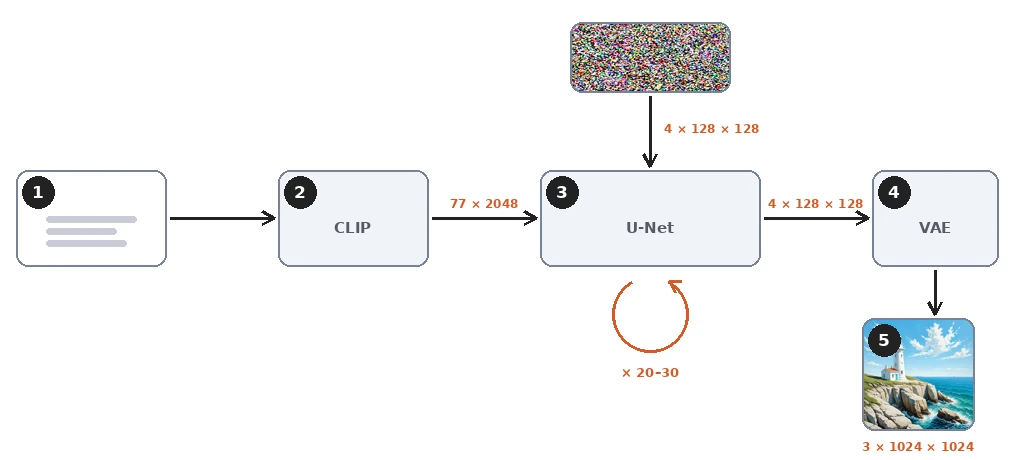
Nothing is searched or copied along the way. There is no database of pictures inside the file. The 2 to 16 GB of weights hold what the network learnt about how captions and images go together, and every output is computed from noise. The network can still memorise images that appeared many times in training, and researchers have extracted a few hundred of them, but that is the exception.
What is a diffusion model? Learning to remove noise
The forward process: adding noise
The idea behind diffusion is simple to state. Take a photo with its caption. Add a measured amount of random noise to it. Ask a network to guess which noise was added, knowing the caption. Compare its guess with the truth and correct the network a little.
Adding the noise is the forward process. It follows a fixed schedule of a thousand levels, from a faint grain at level 50 to pure static at level 999. The network never sees the schedule run; it only sees one noisy image at one level at a time.

Do that over billions of examples and the result is a noise predictor: given a noisy picture, its noise level and a text, it says what the noise probably is. The training objective is just the gap between the predicted noise and the real one. Training Stable Diffusion 1 took about 150,000 hours on A100 data-centre GPUs, according to its model card.
The reverse process: the noise predictor at work
Generation runs the lesson backwards. That is the reverse process. Start from pure noise, which the seed picks. Ask the predictor what the noise is, remove a fraction of it, ask again. DDPM, the 2020 paper that made diffusion practical, did this in a thousand small steps.
The sampler, also called the scheduler in some interfaces, is the rule that decides how big each step is and whether a little fresh noise is added back. Better samplers, DDIM, Euler and the DPM++ family, take larger steps along the same path, which is why 20 to 30 steps are enough today.
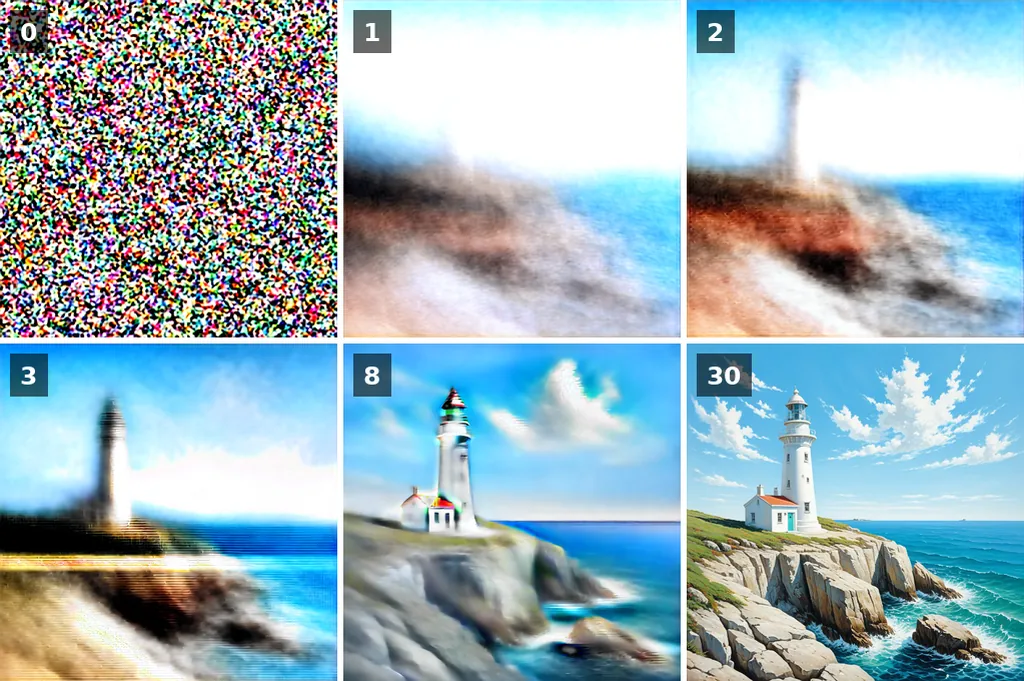
The figure shows the part worth remembering. At every step the model holds a guess of the finished picture, and the guess settles early. The first two or three steps, while the noise is heavy, fix the composition: where the horizon is, where the lighthouse stands, how much sky there is. The later steps refine texture and small details.
The slider below runs through all thirty guesses of the same render.
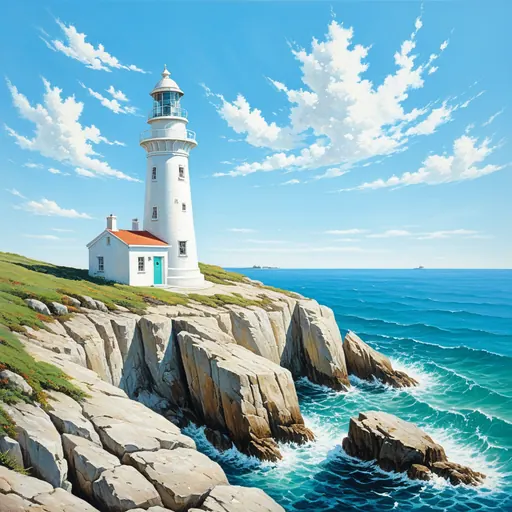
Two practical consequences follow. Changing the number of steps changes the details and sometimes the composition, because the early steps land on other values; it does not simply sharpen the same picture. And the same seed at another image size starts from a different block of noise, so it gives a different picture too. Choose the size first, then look for a seed.
Latent diffusion: the VAE trick that fits it on a gaming card
Earlier diffusion models worked on pixels. A 512 × 512 image is 786,432 numbers, and the predictor had to read and write all of them at every one of its steps. Pixel models such as DALL-E 2 and Imagen got round it by diffusing at 64 pixels and adding upscaling networks, and they were never released anyway.
Stable Diffusion adds a variational autoencoder, the VAE. Its encoder squeezes an image by a factor of eight on each side into four channels: 4 × 64 × 64, or 16,384 numbers, 48 times fewer. The diffusion runs entirely in that compressed space, the latent space. Only at the very end does the VAE's decoder expand the result into pixels.

The latent is not a small picture. Its four channels are a code the decoder knows how to read, and no single channel looks quite like the image. But the layout survives the compression, which is what lets the denoiser decide composition in such a small space.
This is also why the choice of VAE matters to colour and fine detail: each latent number stands for an 8 × 8 patch of pixels, and the decoder invents what lies inside the patch. Stable Diffusion 3 moved to a 16-channel latent for exactly that reason, and fine detail and small text improved with it.
CLIP and cross-attention: how the text steers the image
Three pieces turn words into a direction for the denoiser.
Tokenizer and text encoder: how CLIP reads a prompt
The tokenizer cuts the prompt into tokens, whole common words or fragments of rarer ones. Stable Diffusion 1.5 and SDXL read at most 77 tokens, two of them start and end markers, about 50 to 60 English words. Beyond that, the text is cut, unless the interface splits it into several passes. Put what matters most at the start.
The text encoder of 1.5 is CLIP, a network OpenAI trained on 400 million pairs of images and captions, with one task: bring the numbers that describe a caption close to the numbers that describe its image. After that training, the numbers for "lighthouse" already carry what lighthouses look like. SDXL runs two such encoders side by side, the second an open re-training by LAION on two billion pairs. Stable Diffusion 3 adds a third, T5, which reads whole sentences.
Cross-attention inside the U-Net
Cross-attention is where the text meets the picture. The U-Net is a stack of convolution blocks that shrink the latent and then grow it back, with skip connections between matching sizes. Between those blocks sit attention layers. At every step, each region of the latent looks at the 77 token vectors and weighs which of them concern it. The sky region attends to "sunset" and "clouds", the rock to "cliff". This is why word order, repetition and the weighting syntax of the interfaces have an effect, and why a style word at the start colours the whole image.
It is also the limit of the first versions. CLIP learnt from short alt texts, so it understands lists of subjects and styles well and relations between them badly. "A red cube on a blue sphere" often comes out swapped in 1.5. The prompt guide shows what reliably works.
Guidance scale, negative prompt and seed: the three settings
Three settings appear in every Stable Diffusion interface. They map directly onto the machinery above.
The guidance scale, short for classifier-free guidance (CFG), is the one that decides how hard the text is pushed. At each step the denoiser actually makes two predictions: one with the prompt and one with an empty prompt. The difference between the two is the direction the prompt gives. The final prediction is the empty one plus that difference multiplied by the guidance scale. At 1 the prompted prediction is used as it is, with no push: the image follows the text loosely, with muted colours and a grey sky where the prompt asked for a blue one. Around 5 to 8 it follows the prompt closely with natural colours. Beyond 12 the contrast hardens, the colours saturate and the strokes turn harsh.
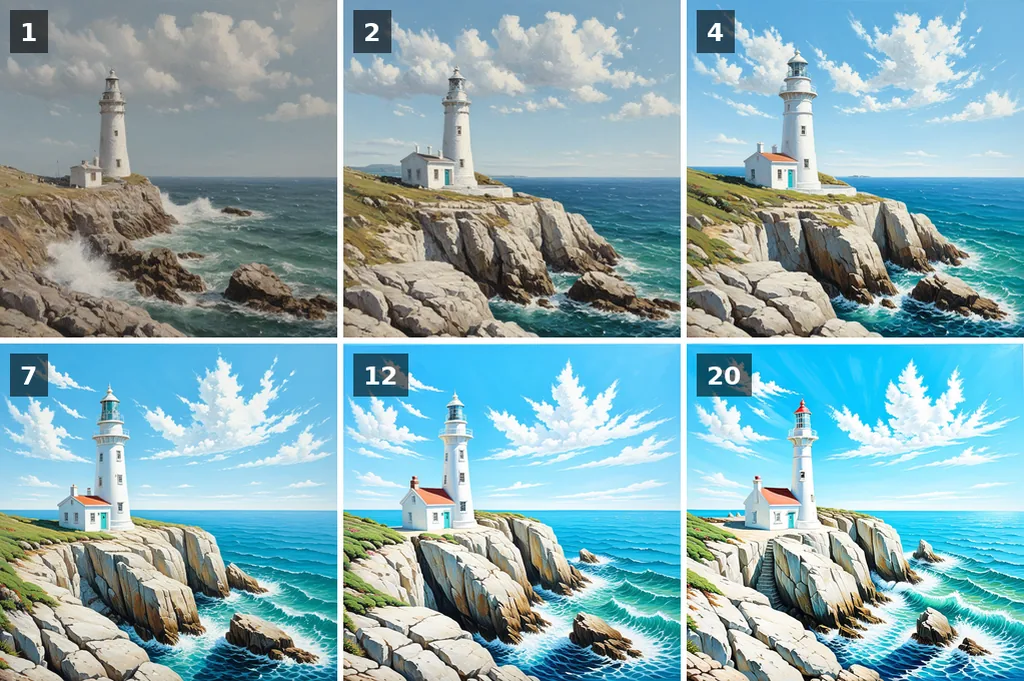
The negative prompt replaces the empty prompt of that second prediction. Instead of reading nothing, the second pass reads "blurry, text, watermark", and the guidance pushes away from it. It costs nothing extra, since the second pass runs anyway, and it only works when the guidance is above 1. The negative prompt guide gives working lists.
The seed is the number that generates the starting noise. Same seed, same prompt, same settings and same model give the same image, down to the pixel, on the same software and hardware; another interface or another card draws the noise differently. Change the seed and the composition changes, since the first steps read another block of noise. Change one word of the prompt and keep the seed, and most of the picture usually holds. That is how a prompt is refined.
From U-Net to transformer: the versions from 1.5 to 3.5
Six main generations appeared in two years, the first two from CompVis and Runway, the rest from Stability AI. Each changed at least one of the three networks.
| Version | Date | Denoiser | Text encoders | Native size |
|---|---|---|---|---|
| 1.4 and 1.5 | August and October 2022 | U-Net, 860 million parameters | CLIP ViT-L | 512 px |
| 2.0 and 2.1 | November and December 2022 | U-Net of the same design, retrained from scratch | OpenCLIP ViT-H | 768 px |
| SDXL 1.0 | July 2023 | U-Net, 2.6 billion, plus a refiner | CLIP ViT-L and OpenCLIP ViT-bigG | 1024 px |
| SDXL Turbo | November 2023 | SDXL distilled to 1 to 4 steps | Same as SDXL | 512 px |
| 3 Medium | June 2024 | Diffusion transformer (MMDiT), 2 billion | CLIP ViT-L, OpenCLIP bigG, T5-XXL | 1024 px |
| 3.5 Large, Large Turbo, Medium | October 2024 | MMDiT, 8 billion; Medium 2.5 billion | Same three | 1024 px |
1.5 remains one of the most fine-tuned models in existence, with tens of thousands of community checkpoints and LoRAs, and it still runs on 4 GB of video memory. SDXL is the workhorse: better hands, faces and composition, and native 1024-pixel output. 3 and 3.5 replaced the U-Net by a transformer that treats text and image tokens together, which is what finally made legible text in images possible: put the words in quotes in the prompt. The SDXL versus Stable Diffusion 3 comparison shows the same prompts on both.
The licences changed too. 1.5 is under the CreativeML OpenRAIL-M licence and SDXL under OpenRAIL++-M, both free for commercial use with a list of forbidden uses. The 3.x models are under the Stability AI Community License, free below one million dollars of yearly revenue.
What you can do with it: image-to-image, inpainting, ControlNet, LoRA
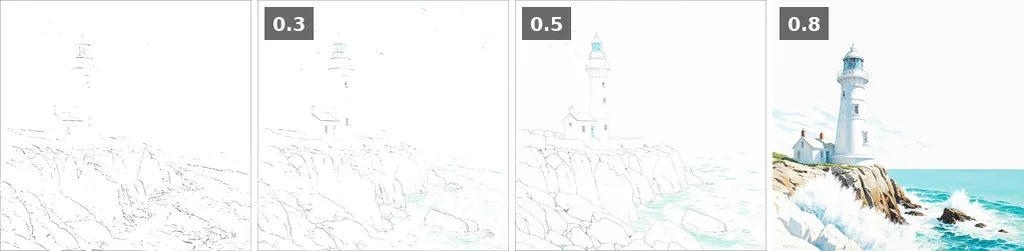
Text-to-image is only the start, because every piece of the pipeline can be reused. Encode a sketch into a latent, add only part of the noise and denoise from there, and you have image-to-image, img2img in the interfaces: the strength, or denoise, setting is how much noise you add. The idea comes from SDEdit. Mask one region of the latent and you have inpainting, or outpainting when the mask is outside the frame. Add a small side network that reads a pose, a depth map or edges, and you have ControlNet. Train a few million extra weights on twenty photos and you have a LoRA that teaches the model a face or a style. Dedicated super-resolution models handle upscaling.
To run it yourself, a recent NVIDIA card with 6 GB of video memory (VRAM) is enough for 1.5 and 8 GB for SDXL. AMD cards work through ROCm, Apple Silicon through the MPS backend. The installation guide covers the three main interfaces. Without a card, the tools on this site need no hardware: Stable Diffusion XL and Stable Diffusion 1.5 run on the site's own GPU with the queue shown live, documented prompts show what each setting does, and 1,731 artist styles show what the model learnt about painters.
Stable Diffusion vs Midjourney vs DALL-E
Against Midjourney and OpenAI's image models, the difference is not quality but control. The weights are public and the model runs locally: your images stay on your disk, you pick the model, you set the seed and you can change any component. In exchange it asks more of you. Midjourney asks for a sentence and gives a polished picture; Stable Diffusion asks for a model, a prompt, a negative prompt and a guidance scale, and gives you exactly what you set.
| Stable Diffusion | Midjourney | DALL-E / GPT Image | |
|---|---|---|---|
| Weights | Public, downloadable | Closed | Closed |
| Runs on your computer | Yes, 6 to 8 GB of VRAM | No | No |
| Price | Free locally; free tools online | Subscription | Subscription or per image |
| Control | Seed, model, LoRA, ControlNet, inpainting, every setting | Parameters and style references | Conversation |
| Fine-tuning | Yes, by anyone | No | No |
| Text in images | Weak before 3, good from 3.5 | Good since v6 | Very good |
The same diffusion principle now powers models from other labs, with other encoders and other licences: FLUX from Black Forest Labs, founded by the original Stable Diffusion authors, and Qwen-Image from Alibaba. They run in the same interfaces, with the same seeds, steps and samplers, so most of this page carries over. Their guidance works differently, FLUX dev has no negative prompt, and they prefer full sentences to keyword lists.
Sources, and how to reuse the figures
The primary sources, in the order the page meets them:
- High-Resolution Image Synthesis with Latent Diffusion Models, Rombach et al., 2022: the Stable Diffusion paper.
- Denoising Diffusion Probabilistic Models, Ho et al., 2020: the forward and reverse processes and the thousand-step schedule.
- Learning Transferable Visual Models From Natural Language Supervision, Radford et al., 2021: CLIP.
- Classifier-Free Diffusion Guidance, Ho and Salimans, 2022: the guidance scale.
- SDXL: Improving Latent Diffusion Models for High-Resolution Image Synthesis, 2023, and Scaling Rectified Flow Transformers for High-Resolution Image Synthesis, 2024: SDXL and Stable Diffusion 3.
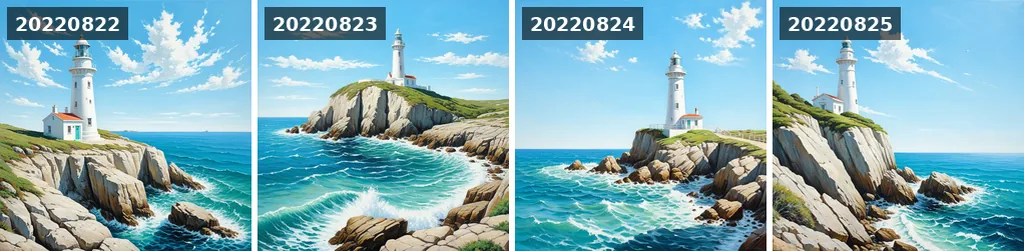
Reusing the figures. The renders and diagrams on this page are released under CC BY 4.0: reuse them in a course, a talk or an article with a link to this page. Every render uses Stable Diffusion XL, euler, 30 steps, CFG 6, seed 20220822, the prompt below, and the negative prompt "text, watermark, signature, blurry, low quality, storm, dark clouds, sunset".
An oil painting of a white lighthouse on a rocky cliff, clear blue sky, bright midday sunlight, a few small white clouds, turquoise sea, waves breaking below, visible brush strokesTo cite this page.
Clicheroux, A. (2026). What is Stable Diffusion and how does it work? stablediffusion.fr. https://stablediffusion.fr/guide/what-is-stable-diffusion