What Qwen-Image 2.1 is
Qwen-Image 2.1 is one checkpoint for two jobs. It generates an image from text, and it edits an existing picture from a sentence and up to ten reference images. The generation part is a 7-billion-parameter diffusion transformer. It is paired with a Qwen3-VL 8B encoder for the prompt and the reference images, loaded in ComfyUI as a separate file.
A language model as encoder is what lets it read whole sentences, layout instructions and quoted words, rather than keyword lists. What the model is, its versions and how it works compared with Stable Diffusion are covered in What is Qwen-Image?
Qwen presents 2.1 as better on textures, typography and portrait lighting. It works at native 2K with no upscaler: 2048 × 2048 for a square, 2528 × 1696 for 3:2, 2752 × 1536 for 16:9. It can also output a real alpha channel when the prompt asks for a transparent background.
The price is time. On a consumer card with 16 GB of video memory, the int8 weights take about 40 seconds for a 1-megapixel image. A 4-megapixel image takes about four and a half minutes with the settings below.
One thing to know before downloading. The weights are under the Qwen Research License: research and evaluation only. Any commercial use needs a separate licence from Qwen. The first Qwen-Image, released in August 2025, was Apache 2.0. Version 2.1 is not.
How to write a prompt for Qwen-Image 2.1
Write sentences, not tags. The text encoder is a language model. It reads word order, prepositions and quotes, and it takes everything literally. A "lighthouse cat" becomes a cat drawn on a lighthouse.
The structure below gave the best results over about a thousand images. Keep this order.
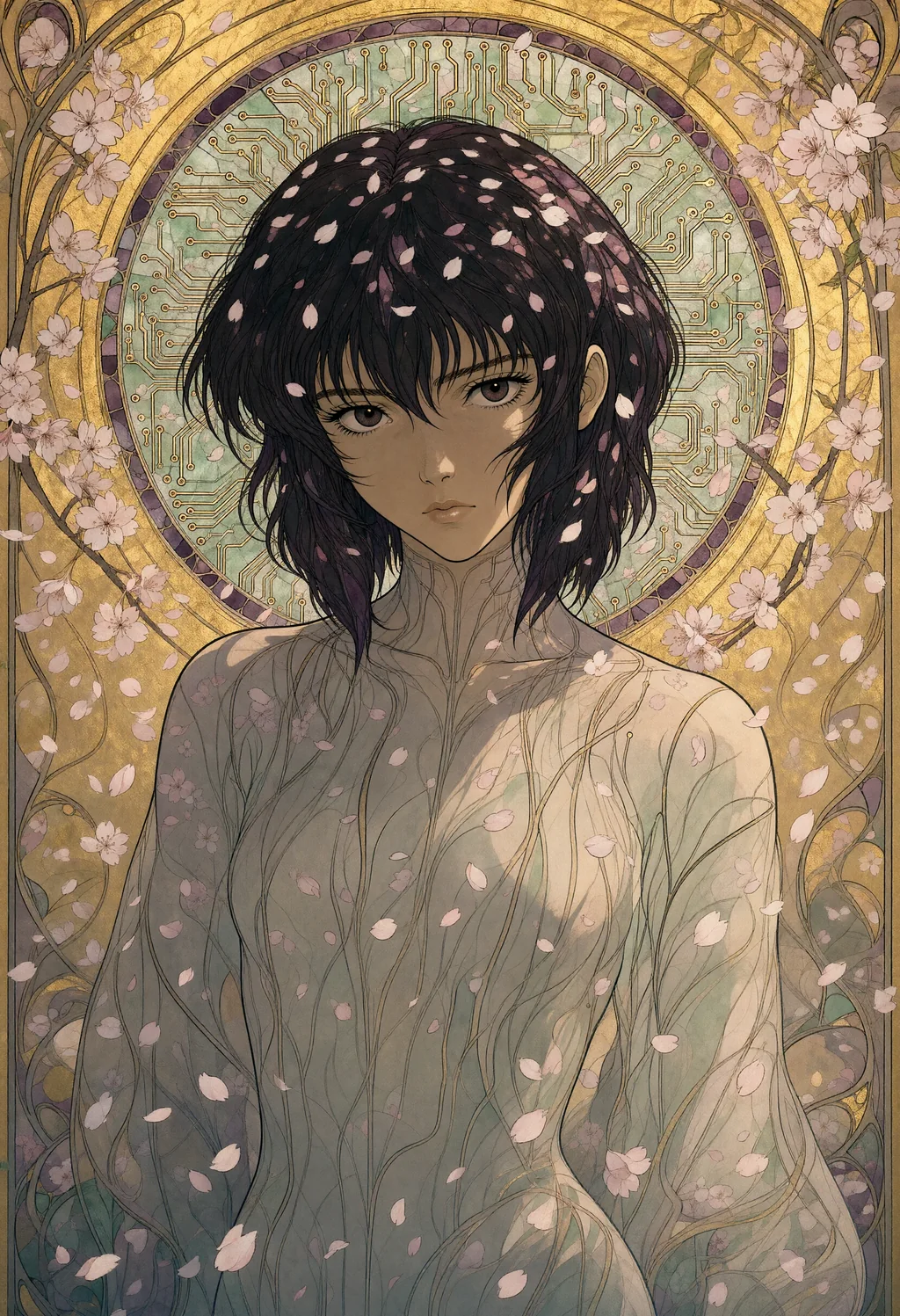
- Medium and subject first: "An art nouveau illustration of Motoko Kusanagi standing in falling cherry blossoms". The medium set at the start colours everything after it.
- Setting: place, era, weather, or what fills the air. "in falling cherry blossoms", "in the 1980s", "during a blizzard".
- Light with its direction: "lit from the front by soft diffuse light, with gentle shadows". The direction is followed. A bare "dramatic light" is not.
- Framing: "close-up of the subject, looking at the viewer", medium shot, seen from above, the subject tiny in a vast landscape.
- Materials and palette: "flowing ink lines, flat gold leaf background, muted jade and plum". This is what the model renders best at 2K.
- Restrictions, written in the prompt: "no lettering, no watermark", "five fingers on each hand". At guidance 1 the negative prompt is ignored, so the prompt itself has to carry them.
The whole prompt of the illustration above, in that order: An art nouveau illustration of Motoko Kusanagi standing in falling cherry blossoms, a halo of circuit traces around her head like a stained glass window. Lit from the front by soft diffuse light, with gentle shadows. Close-up of the subject, looking at the viewer. Rendered with flowing ink lines, flat gold leaf background, muted jade and plum, fine ornamental borders. The atmosphere is calm and melancholic. Natural proportions, the face in focus. No text, no watermark.
Text works when it is quoted and placed. "A banner above the door reads 'OPEN ALL NIGHT'" comes out right nearly every time, in capitals or not.
The reverse is also true. A shopfront, a diner or an arcade with no text requested will grow an invented sign. So say "no lettering" whenever the scene contains a facade.
Characters the model does not know are replaced by a lookalike, without warning. The Marsupilami became a monkey. Mothra and Marvin the Martian came out right.
Every Qwen card on the prompt examples page follows this structure, with its seed, size and settings.
Settings that work, measured
The official ComfyUI template runs at a guidance (CFG) of 1 with 25 steps. The model card uses 40 steps. The settings below settled on CFG 3.
Last tested on 16 October 2026, on the same seeds, these settings gave the most detailed and the most faithful images:
| Setting | Value |
|---|---|
| Guidance (CFG) | 3, with a negative prompt |
| Negative prompt | artifacts, washed-out colors, low quality, low resolution, blurry, extra fingers, missing fingers, deformed hands, bad anatomy, extra limbs, text, watermark, signature |
| Model patches | APG (eta 1, norm threshold 10, momentum 0.3) then FreSca (low 1, high 2, cutoff 8), ahead of the sampler |
| Sampler | euler, simple scheduler |
| Steps | 25 at 1 megapixel, 20 at 2.5 and 4 megapixels |
| LoRA | none |
Guidance is the one setting that does not change the scene. At the same seed and size, CFG 1 and CFG 3 give nearly the same composition. What differs is the rendering.
At CFG 1 the image is flatter and loses fine texture. Embroidery stitches turn into cloth. A cartoon face loses its pupils and mouth. Metal loses its rivets.
Pushing CFG 1 to 30 steps brings the sharpness back, but not the materials nor the contrast. At 2 megapixels, a size tried once, 40 steps give a clean image that is still flatter, and it reads the prompt less reliably.
APG keeps CFG 3 from oversaturating. FreSca sharpens the high frequencies. Both only act when the guidance is above 1.
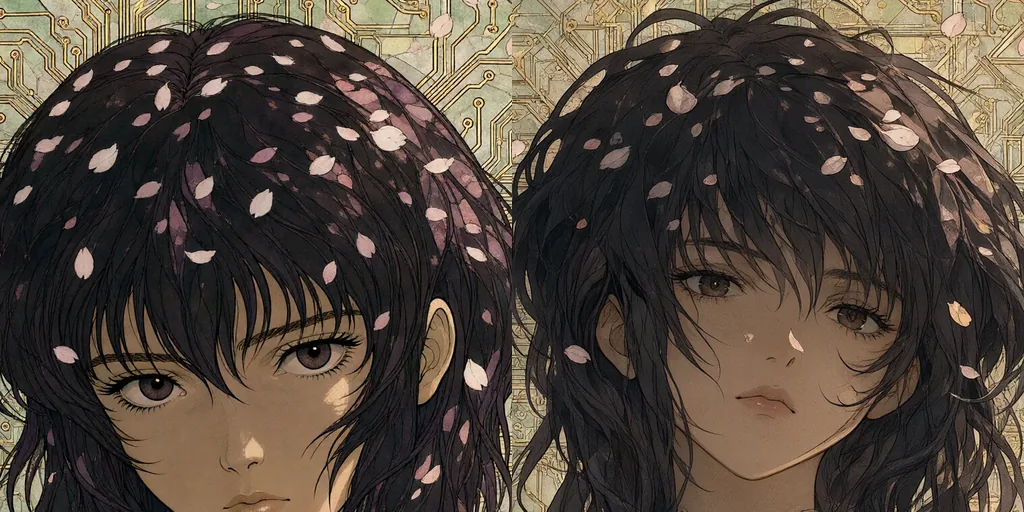
Guidance above 1 costs a second pass per step, so CFG 1 is twice as fast. On the test card that is 120 to 135 seconds against 255 to 275 for a 4-megapixel image. The slower one was worth it on every one of ten test pairs.
Resolution and steps: what changes the image
Like any diffusion model, Qwen-Image 2.1 does not resize an image when the size changes. It produces another take of the same seed, so a seed found at 1 megapixel does not carry over to 2K.
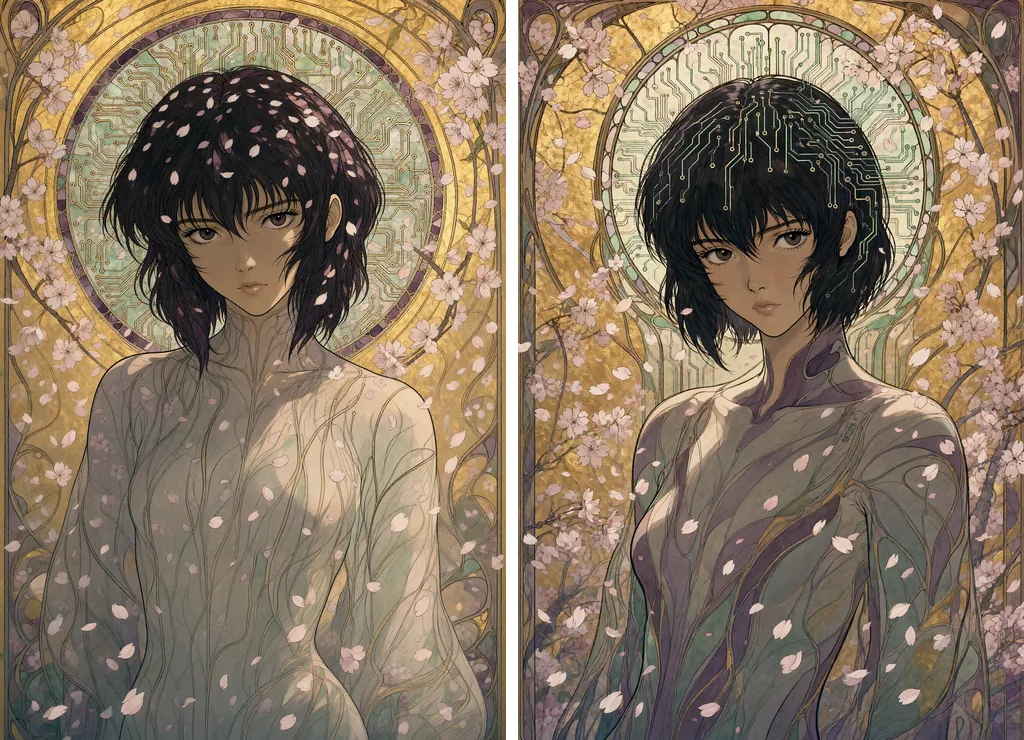
Going from 1 megapixel to 2.5 or 4 gave a different picture in every pair tested. Between 2.5 and 4 megapixels the composition held in eight pairs out of ten.
In the illustration below only the details moved. At 2.5 megapixels the circuit traces left the halo for the hair.
Changing the number of steps also changes the image once the gap is large. 20 and 25 steps give nearly the same picture. 16 steps drifts. So there is no way to preview at 1 megapixel and render the same image larger. Pick the size first, then the seed.
Times measured with CFG 3, APG and FreSca, int8 weights, on one 16 GB consumer card, in landscape or the portrait equivalent:
| Size | Steps | Time per image |
|---|---|---|
| 1 megapixel (1216 × 832) | 25 | about 40 s |
| 2.5 megapixels (1920 × 1312) | 20 | 120 to 135 s |
| 4 megapixels (2432 × 1664) | 20 | 255 to 275 s |
| 4 megapixels | 25 | 315 to 335 s |
At 2.5 megapixels the detail is a little softer than at 4 when the same area is compared at 100 %. But the model follows the style of the prompt at least as well, and on the ten test pairs sometimes better. An embroidery showed its stitches more clearly at 2.5 megapixels than at 4.
For a gallery served at 1024 pixels, 2.5 megapixels at 20 steps is the sweet spot. For a print, 4 megapixels at 20 steps.
Speed-ups: Turbo, guided Turbo and the rest
The Turbo. Qwen released Qwen-Image-2.1-Turbo on 9 October 2026. It is a distilled checkpoint that runs in 8 steps at CFG 1 with a fixed sigma schedule. Comfy-Org ships it as an int8 file and as a LoRA for the base model, with its own templates in ComfyUI. It was measured on 17 October on the same ten seeds and sizes as the CFG 3 renders of this guide, with the template's exact graph.
| Setting | Time per image |
|---|---|
| Turbo checkpoint, 8 steps, CFG 1, 1 megapixel | 9 to 10 s |
| Turbo checkpoint, 8 steps, CFG 1, 4 megapixels | 38 to 39 s |
| Guided Turbo, described below: Turbo checkpoint, 8 steps, CFG 3 with APG and FreSca, 4 megapixels | 66 to 71 s |
| Base checkpoint plus Turbo LoRA, 8 steps, CFG 1, 4 megapixels | 52 to 55 s |
| Base checkpoint, CFG 3, 20 steps, 4 megapixels | 255 to 275 s |
Seven times faster at 4 megapixels, four times at 1. The images are clean: sharp, well lit, no anatomy slips on the ten seeds, lettering correct on the same prompts as the base model. The objects of the prompt are there, sometimes better than with the base model. The tortoise in her race car, which the base model had dropped in every render, appeared with Turbo.
What it loses is the medium. On every non-photographic prompt of the ten seeds, the distilled model drifted towards photographic realism. An embroidery of a crocodile became a photograph of a crocodile. A charcoal drawing lost its grain. A paper-cut Marvin the Martian turned into a vinyl toy. Invented lettering on facades is the same as with the base model.
On the ten seeds the LoRA on the base checkpoint gave the same images as the Turbo checkpoint, only slower. So the checkpoint is the one to download. A seed gives a different picture from the base model, as with any size change. The licence is the same: research and evaluation only.
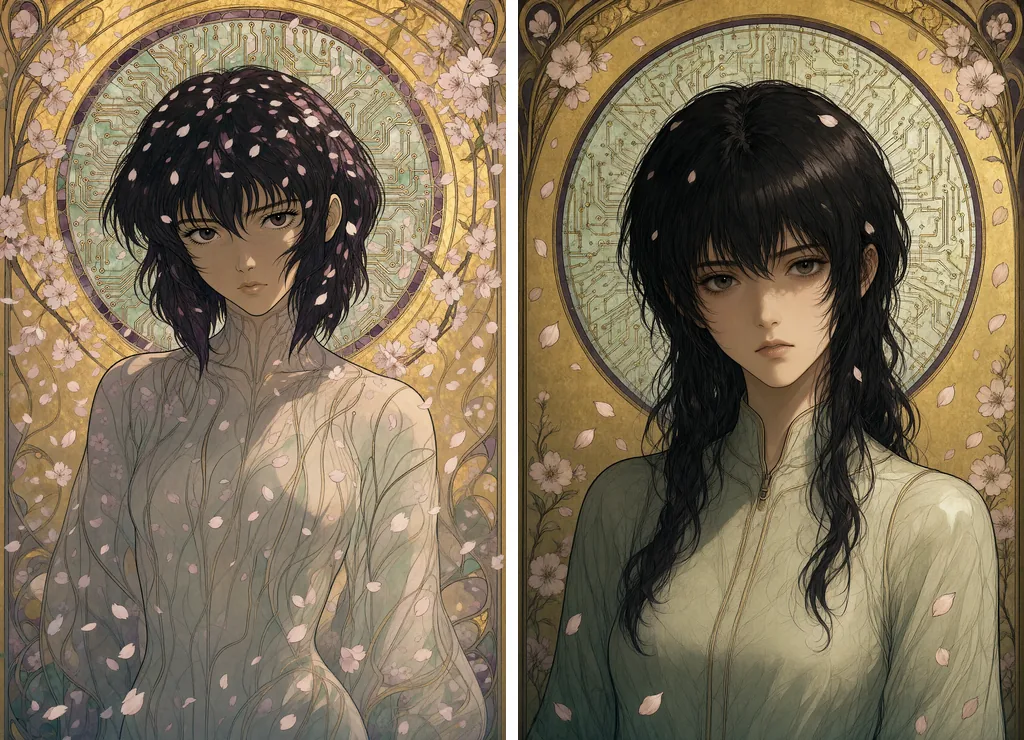
The guided Turbo. The Turbo is not locked to CFG 1. Tested on 17 October 2026 on the same ten seeds plus the illustration of this guide. Keep its checkpoint and its 8 fixed sigmas, and take only the guidance block of the base preset: CFG 3, the negative prompt, APG then FreSca.
The graph is the Turbo template itself. Set its CFGGuider to 3 instead of 1, fill in the negative prompt, and insert APG then FreSca on the model path between the loader and the guider. The ManualSigmas node and the sampler stay as they are.
The result keeps the Turbo's composition and recovers what CFG 1 had flattened: contrast, saturation and fine detail. On the illustration of this guide, the circuit traces of the halo come back crisp and gilded, and the petals return. On the ten test seeds, the scales, the fur and the embroidered vest sharpen in the same way. What it does not recover is the medium. The embroidery stays a photograph of a crocodile.
The cost is the second pass per step: 66 to 71 seconds for a 4-megapixel image against 38 to 39. That is still nearly four times faster than the base model.
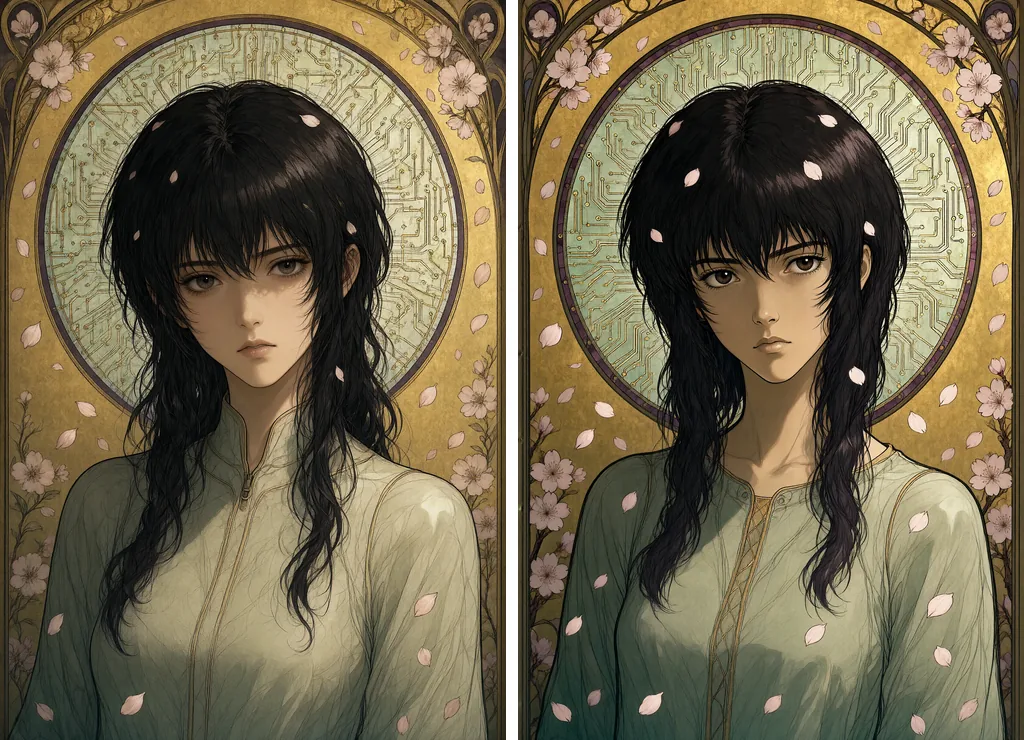
Download the workflow. The ComfyUI workflow of the guided Turbo (JSON) renders this illustration as it is: 1664 × 2432, seed 57658043, CFG 3 with APG and FreSca, the negative prompt of this guide. Drop the file into ComfyUI; it expects the three model files named in the last section. Free to reuse under CC BY 4.0, with a link to this page.
Do not try to help the Turbo with more steps. Given 20 steps and the simple scheduler at 4 megapixels and CFG 3, as if it were the base model, it overcooks: hard hair strands, a grainy halo, pushed contrast. And it takes 169 seconds. The distilled checkpoint wants its 8 sigmas.
A sensible split. The plain Turbo as a draft mode, with seven times more candidates per hour to pick from. The guided Turbo when a photographic or clean-lined prompt needs detail fast. The base model at CFG 3 for anything painted, drawn or crafted, where the medium itself is the point.
Other distillations. LightX2V published a 4-step Lightning LoRA for 2.1 on 13 October 2026. A community 8-step LoRA, Turbo8, exists as well. Both run at CFG 1 like the Turbo. Neither has been measured here.
The prefix cache node. ComfyUI's QwenImage21Cache node only sets the device and precision of the cache the model already keeps. At its defaults it changes nothing. Its int8 mode halves the cache, which helps when memory runs short at 2K or in editing with several reference images. No visible loss came with it in these tests.
Fewer steps. 16 steps saves about a fifth of the time, but it changes the composition and gains no sharpness over 20. If time is the constraint, lower the size before the steps.
Running Qwen-Image 2.1 locally
ComfyUI supports the model natively. Three files go in the usual folders: the diffusion model in diffusion_models, the Qwen3-VL text encoder in text_encoders, the VAE in vae.
On a 16 GB card, take the int8 versions published by Comfy-Org. The bf16 weights also work, but they spill into system memory and take two to six times longer for no visible gain.
The graph is short:
- UNETLoader, CLIPLoader with the type
qwen_image, VAELoader; - TextEncodeQwenImage21, which takes the prompt and the negative prompt together and outputs both conditionings;
- an empty latent at the chosen size;
- APG then FreSca on the model path;
- a KSampler at CFG 3 with euler and the simple scheduler, then VAEDecode.
For a transparent image, wrap the subject in the model card's recommended form: "This is an RGBA image with transparency. [the subject]. The image has alpha channel and the background is transparent." Then save as PNG.
Memory: at 1 megapixel, the int8 model, the encoder and the VAE run in 16 GB without touching system memory. ComfyUI swaps the encoder out of video memory once the prompt is encoded. At 4 megapixels the prefix cache was set to int8, and memory never ran out. The first image of a session takes longer while the files load.