アセットごとに1枚ではなく、1枚のシート
スプライトごとに1枚の画像をモデルに求めるのではなく、1枚のシートを求めます。グリッド状にレイアウトした 4 メガピクセルの画像を1枚生成し、そのセルをスクリプトで切り分けます。
- 一つの被写体、たとえばキャラクターなら、同じ人物の4ビューを収めた1枚のシートです。
- 同系統のオブジェクト群なら、8〜12個の異なるオブジェクトを収めた1枚のシートです。
- 武器のような重要なアイテムなら、そのアイテムの複数ビューを収めた1枚のシートです。
シートには三つの利点があります。
- 一貫性。4つのビューが同じ生成から出てくるので、色、衣装、武器、光がすべて同じです。別々に4回生成すると、4人の別人になります。
- 一つのスタイルを、同系統のオブジェクト全部で共有できます。
- スループット。1枚のシートは4〜5分で、4〜12個のスプライトが得られます。
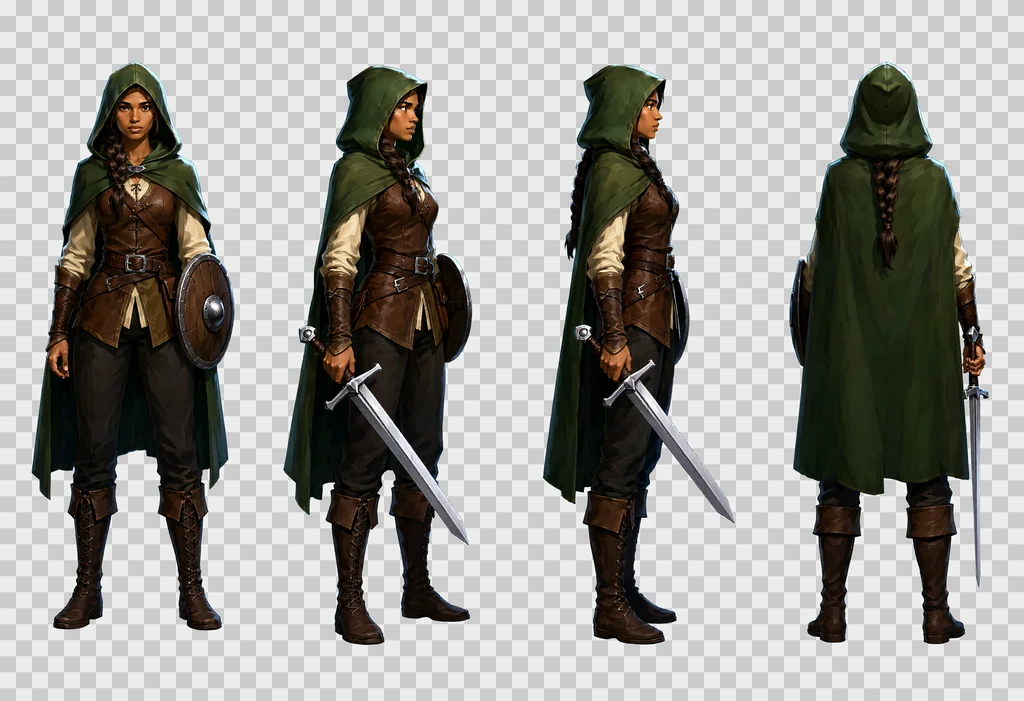
シートの用途はゲームだけではありません。キャラクターのターンアラウンドは、アプリのモックアップ、漫画、絵コンテの参照画像としても使えます。Seedance、MiniMax Hailuo、Wan 2.2 のような image-to-video(画像から動画)モデルが、出発点として受け取る参照画像の形でもあります。
以下の内容はすべて、一つのゲーム向けに 1000 ファイル超のセット、つまりキャラクター、アイテム、エフェクト、小道具、テクスチャを制作しながら確認したものです。設定は Qwen-Image 2.1 の設定ガイドに従っています。
設定と ComfyUI のグラフ
Turbo ではなくベースモデルを使い、ネガティブプロンプト付きの CFG 3 で、モデル経路に APG と FreSca を入れます。グラフにプロンプトアップサンプラーはありません。プロンプトは書いたとおりに入ります。
| ノード | 設定 |
|---|---|
| UNETLoader | qwen_image_2.1_int8_convrot.safetensors |
| CLIPLoader | qwen3vl_8b_int8_convrot.safetensors、タイプ qwen_image |
| VAELoader | qwen_image_2.1_vae_bf16.safetensors |
| QwenImage21Cache | device auto、dtype int8 |
| APG | eta 1.0、norm threshold 10.0、momentum 0.3 |
| FreSca | scale low 1.0、scale high 2.0、frequency cutoff 8 |
| TextEncodeQwenImage21 | プロンプトとネガティブプロンプト、resolution 1024 |
| EmptyLatentImage | シートは 2432 × 1664、テクスチャは 1024 × 1024 |
| KSampler | 20ステップ、CFG 3.0、euler、simple、denoise 1.0 |
| VAEDecode、SaveImage | PNG は RGBA で出力されます。次のセクションを参照 |
モデル経路は UNETLoader、次に QwenImage21Cache、APG、FreSca、KSampler の順です。セットを制作したマシンで計測した時間:
| 作業 | 時間 |
|---|---|
| シート、2432 × 1664、20ステップ | 230〜320秒 |
| テクスチャ、1024 × 1024、テキストから画像 | 約80秒 |
| img2img パス、1024 × 1024 | 約40秒 |
設定ガイドには、12 GB のカードがこのサイズの 4 メガピクセルの画像を int8 ウェイトでピーク 11.5 GB で描いた記録があります。他に何もカードを使っていなければ、シートは収まるはずです。
ComfyUI を API 経由で動かすなら、落とし穴が二つあります。/prompt に送る JSON では、参照画像はフラットなキーで渡します:"images.image_1": [node, 0]。入れ子の形 "images": {"image_1": …} はエラーなしに受理されますが、参照は黙って無視されます。そして、受け取った PNG が RGBA モードかを必ず確認してください。枠組みの文が不適切なプロンプトでは背景が不透明になります。その場合は切り出さず、エラーにしてください。
ネイティブの透過
Qwen-Image 2.1 は、プロンプトを二つの文で挟めば、自前でアルファチャンネルを出力します。
- 冒頭:
This is an RGBA image with transparency. - 末尾:
The image has alpha channel and the background is transparent.
結果は本物の RGBA PNG です。半透明のピクセルは全体の約 1 % で、色のフリンジはありません。これで、以前のマゼンタ背景を抜く方法は不要になりました。あの方法は縁が残り、色かぶりの掃除が必要でした。
末尾の文に no ground, no cast shadows, no frames, no text, no labels を足してください。これがないと、モデルは各被写体の下に影や地面を描きたがり、切り出しが壊れます。
シート用プロンプトの書き方
プロンプトを書き直してくれるものは何もないので、長く正確に書く必要があります。このセットのプロンプトは 2,500〜3,000 文字で、短いプロンプトではビューが似通った出来の悪いシートになります。
以下の順番がうまくいったものです。この順番を守ってください。
- 冒頭の RGBA の文。
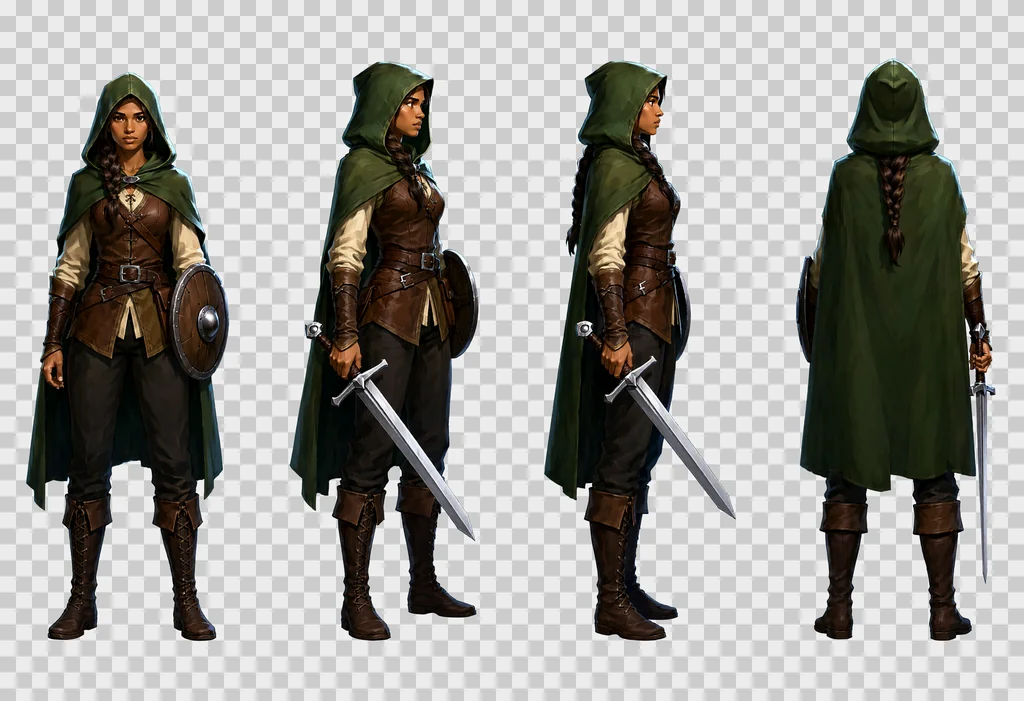
- 被写体とグリッド。「A game character turnaround sheet of one single character, description, drawn four times at exactly the same scale in a strict row of 4 equal cells with generous empty space between the cells, read left to right.」(一人のキャラクターのゲーム用ターンアラウンドシート、説明、等しい4セルの厳密な横一列に同一スケールで4回描画、セル間に十分な余白、左から右の順に読む)
- セルを一つずつ、番号付きで。「cell 1, … ; cell 2, … ; cell 3, … ; cell 4, …」4 × 2 のグリッドでは行も指定します:「Top row: cell 1, … Bottom row: cell 5, …」
- 同一性の指定。「Same character in every cell: identical colours, proportions, costume, weapon and lighting.」(どのセルでも同じキャラクター:色、プロポーション、衣装、武器、照明が同一)
- スタイルブロック。セット全体で同じものを使います。
- 末尾の RGBA の文。
上のレンジャーのシートのプロンプト全文:
This is an RGBA image with transparency. A game character turnaround sheet of one single character, a young woman ranger in her twenties with light brown skin, a long dark braid over one shoulder, a hooded forest-green cloak, a brown leather jerkin over a cream linen shirt, dark trousers, tall laced boots, a straight one-handed sword with a plain steel crossguard and a leather-wrapped grip held low in her right hand with the point toward the ground, and a small round wooden buckler strapped to her left forearm, drawn four times at exactly the same scale in a strict row of 4 equal cells with generous empty space between the cells, read left to right: cell 1, standing at rest, seen straight from the front, both feet on the same line, face fully visible; cell 2, standing at rest, turned 45 degrees to her right so we see the front and her right side, the sword arm nearest the viewer; cell 3, standing at rest in strict profile, facing right, one eye visible, the braid down her back, the sword in front of her; cell 4, standing at rest seen directly from behind, the back of the hood, the cloak and the braid, the sword hanging point down along her right leg so that exactly one blade shows beside the cloak, no face. Same character in every cell: identical colours, proportions, costume, weapon and lighting. Style: hand-painted game illustration, visible brush strokes, rich material detail, crisp silhouettes, soft frontal light from slightly above, a thin cool rim light, no outline, no motion blur. The image has alpha channel and the background is transparent, no ground, no cast shadows, no frames, no text, no labels.
試行から学んだルール:
- 物体だけでなく素材を描写する。「a battle axe: a long straight ash-wood haft and one broad crescent steel blade with a bearded lower edge, the head wedged and riveted, the edge bright and nicked」(戦斧:長くまっすぐなトネリコの柄、下端が顎状に伸びた幅広い三日月形の鋼の刃、楔とリベットで固定された頭部、光って刃こぼれのある刃先)。
- 各ビューは名前ではなく、カメラに何が見えるかで描写する。「seen from a three-quarter back angle, turned 135 degrees so we see its back and its left side, the face hidden」は効きます。「back three-quarter view」だけでは、効く頻度がずっと下がります。
- 真上からのビューを加えるなら念押しが要る:camera pointing straight down、頭頂部と肩だけが見える、顔なし、「like a token on a tactical board game map」(戦術ボードゲームの盤上の駒のように)。
- モデルが逸れるときは、あってはならないものを書く。手足のない被写体は、テキストが一般的だと攻撃のセルで爪と口が生えます。「no arms, no legs, no teeth」と書いてください。
- アクションのセルを加えるなら、被写体ごとに書く。「the subject attacks」という共通のテキスト一つでは、全被写体のポーズが弱くなります。被写体ごとに固有の予備動作と攻撃を与えます。振り上げた棍棒、噛みつき、火炎の吐息、触手。
- 描画を変えてしまう語に注意する。インベントリアイコン用の「bold simplified, strong contrast, clean silhouette」は、白黒のピクトグラムになりました。カラーのアイコンには「in full colour, painted with exactly the same rich materials as cell 1」(フルカラーで、セル1とまったく同じ豊かな素材感で描く)と書きます。
- セット全体で一つのスタイルブロックにすると、被写体、オブジェクト、小道具が同じ世界に収まります。このセットのブロックは上のプロンプトにあります:手描きのゲームイラスト、見える筆致、素材の描き込み、くっきりしたシルエット、やや上からの柔らかい正面光、冷たいリムライト、輪郭線なし、モーションブラーなし。
このセットのネガティブプロンプト:
artifacts, washed-out colors, low quality, low resolution, blurry, extra fingers, missing fingers, deformed hands, bad anatomy, extra limbs, text, watermark, signature, labels, captions, letters, numbers, cast shadow, ground, floor, gradient background, frame, border lines, photo, 3d render
シートのテンプレート
シートはすべて 2432 × 1664 ピクセルです。
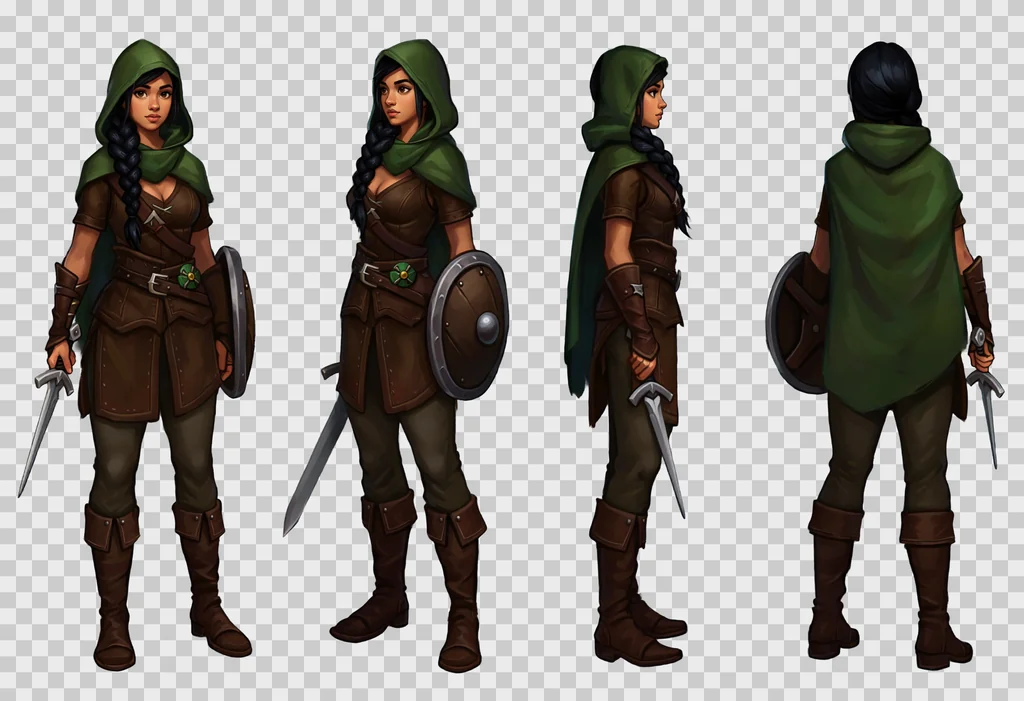
単一の被写体:横一列の4セル、キャラクター一人
| セル | ビュー |
|---|---|
| 1 | 静止、正面 |
| 2 | 静止、斜め前 |
| 3 | 静止、真横 |
| 4 | 静止、背面 |
横一列の4ビューは、すべてのテストで保たれたレイアウトです。縦長のセル、大きな人物、そして各ビューで武器が正しく描かれます。真上からのビューとアクションの2セルを加えた 4 × 2 のグリッドも使えますが、その追加の4セルこそがシートの崩れどころです:背面ビューに二本目の刃、真上から見た剣の位置違い、攻撃の手の変形。必要なときに加え、一つずつ確認してください。
オブジェクト群:4 × 3 または 4 × 2、異なるオブジェクト
セルごとに1行:「Cell 5, row 2 column 1: description.」(セル5、2行1列:説明)。細長いオブジェクトには、セルを埋めるように「lying horizontally across the cell, pointing to the right」(セルを横切って水平に、先端を右へ)を付けます。最後に「Exactly one object per cell, N objects in all, no duplicates, no object crossing into another cell, each object drawn large enough to fill most of its cell.」(セルごとに必ず1個、全部で N 個、重複なし、隣のセルにはみ出さない、各オブジェクトはセルの大部分を埋める大きさで)で締めます。
セットで使った最大数は1シート12オブジェクトです。それを超えるとセルが小さくなります。
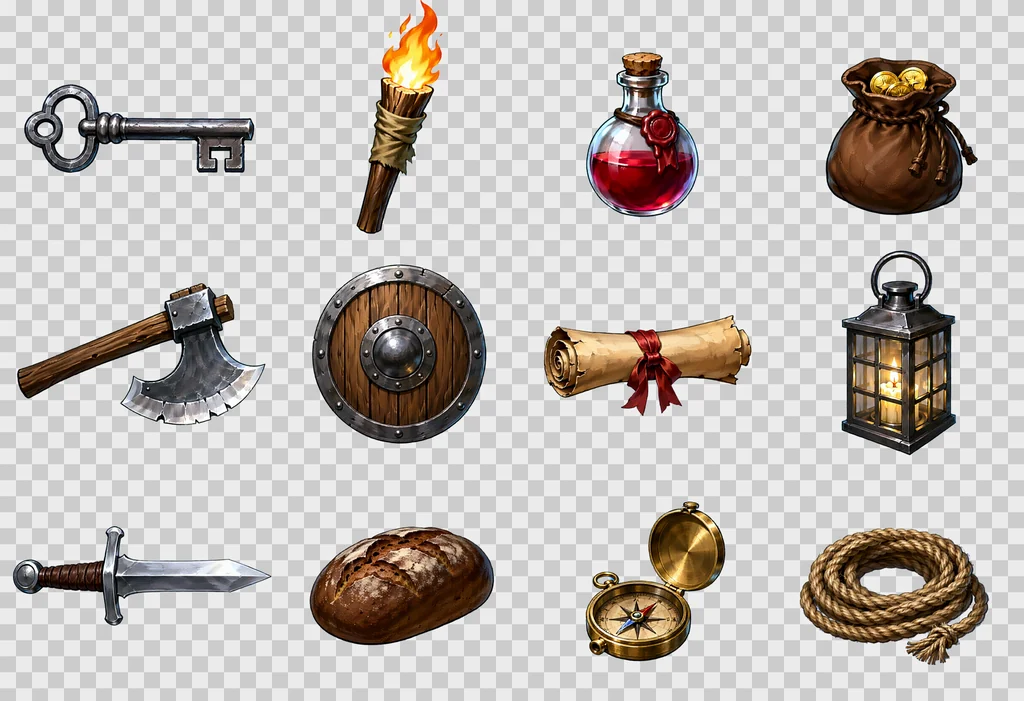
このシートのプロンプト全文:
This is an RGBA image with transparency. A game item sheet of twelve different dungeon objects, each drawn large in its own cell of a strict 4 by 3 grid of equal cells with generous empty space between the cells, read left to right then top to bottom. Cell 1, row 1 column 1: an iron key with a looped bow and two square teeth, lying horizontally across the cell, pointing to the right. Cell 2, row 1 column 2: a wooden torch, a split oak stick wrapped in tarred cloth, the flame burning upward. Cell 3, row 1 column 3: a small red health potion, a round glass flask with a cork stopper and a wax seal. Cell 4, row 1 column 4: a leather coin pouch, drawstring closed, bulging, two gold coins showing at the mouth. Cell 5, row 2 column 1: a battle axe, a long straight ash-wood haft and one broad crescent steel blade with a bearded lower edge, the head wedged and riveted, the edge bright and nicked, lying horizontally across the cell, pointing to the right. Cell 6, row 2 column 2: a round wooden shield with an iron rim and a central iron boss, three planks visible, seen straight on. Cell 7, row 2 column 3: a rolled parchment scroll tied with a red ribbon, lying horizontally across the cell, pointing to the right. Cell 8, row 2 column 4: a lantern, a square iron frame with four glass panes and a ring handle, a candle glowing inside. Cell 9, row 3 column 1: a short sword with a plain crossguard, a leather-wrapped grip and a round pommel, lying horizontally across the cell, pointing to the right. Cell 10, row 3 column 2: a loaf of dark rye bread with a cracked crust. Cell 11, row 3 column 3: a brass compass in an open round case, the needle visible. Cell 12, row 3 column 4: a coil of hemp rope with a frayed end. Exactly one object per cell, twelve objects in all, no duplicates, no object crossing into another cell, each object drawn large enough to fill most of its cell. Style: hand-painted game illustration, visible brush strokes, rich material detail, crisp silhouettes, soft frontal light from slightly above, a thin cool rim light, no outline, no motion blur. The image has alpha channel and the background is transparent, no ground, no cast shadows, no frames, no text, no labels.
小道具とエフェクト:4 × 2 または 4 × 3
小道具:「dungeon fixtures seen straight on from the front」(正面から見たダンジョンの設備)、均一な光で。エフェクト:「glowing, with soft luminous edges」(発光し、縁が柔らかく光る)。飛び道具:「flying to the right」(右へ飛ぶ)。
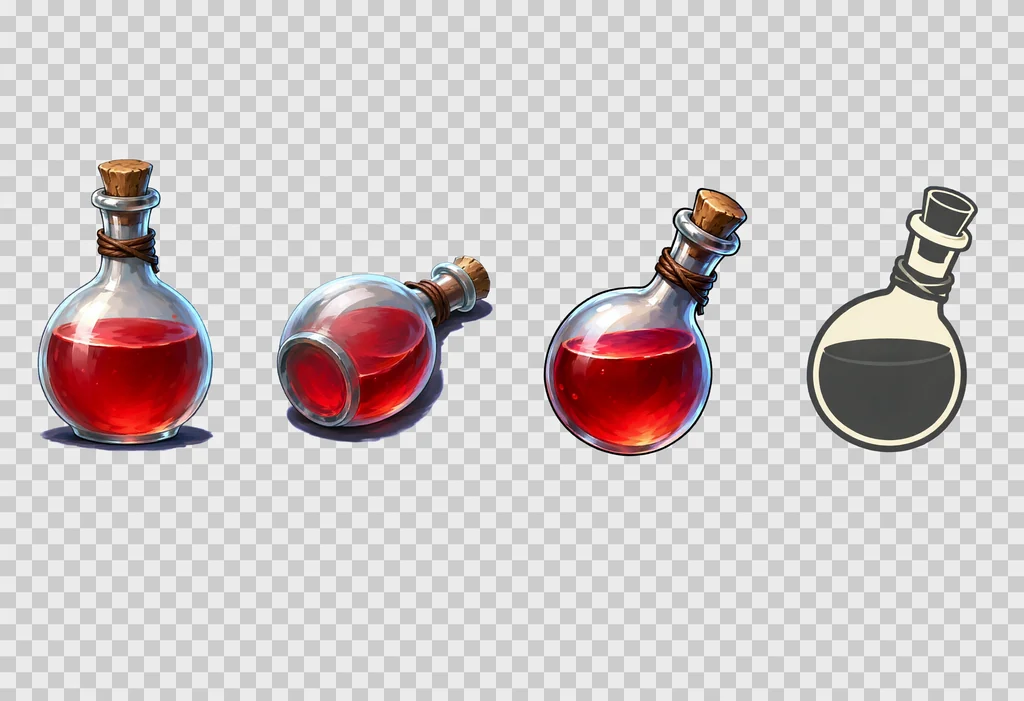
一つのアイテムを複数ビューで:横一列の4セル
4セルすべてに同じオブジェクトを入れます。正面からの基本ビュー、地面に置いて上から見た姿、カラーのインベントリアイコン、2色のアクションアイコンです。投げられた姿は2行目に加えられます。ファルシオンと斧の最初のシリーズでは、刃先をこちらに向けた斧も含めて、説得力のある短縮法(フォアショートニング)で描けましたが、正面から見た投擲武器は最も失敗しやすいセルです。このテンプレートはセットの中で最も新しく、まだ検証中です。
同じレシピを別のスタイルで
グリッド、セルのテキスト、RGBA の枠組みはスタイルに依存しません。変わるのはスタイルブロックだけです。下のシートは、レンジャーのプロンプトのスタイルブロックを次のいずれかに差し替えたものです:
- ピクセルアート。
Style: 16-bit pixel art, a visible pixel grid, flat colours with two or three shades per material, hard pixel edges, a one-pixel dark outline, no anti-aliasing, no gradients. - アニメ。
Style: anime cel shading, clean dark line art, flat colours with one hard shadow tone, small bright highlights, a saturated palette, soft frontal light. - フラットベクター。
Style: flat vector illustration, simple geometric shapes, no gradients, no texture, a limited palette of six colours, thick uniform outlines, soft frontal light. - ローポリ。
Style: low poly 3D render look, visible flat triangular facets, matte materials, no texture detail, soft studio light from the front and above.
ローポリのブロックでは、ネガティブプロンプトから「3d render」を外してください。さもないと二つの指示がぶつかります。
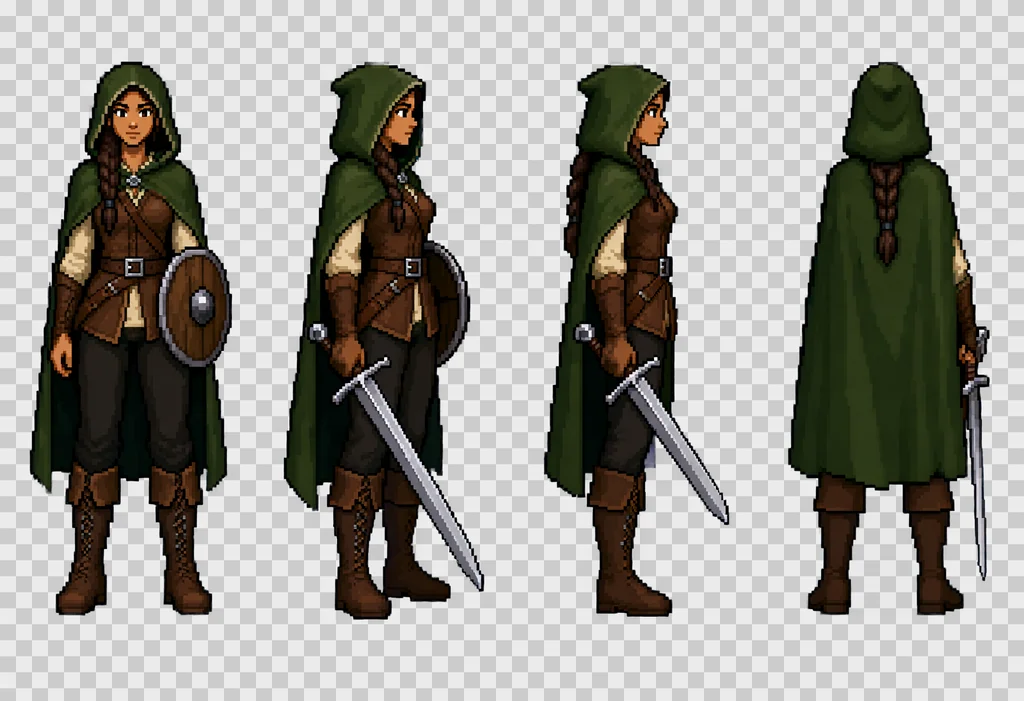
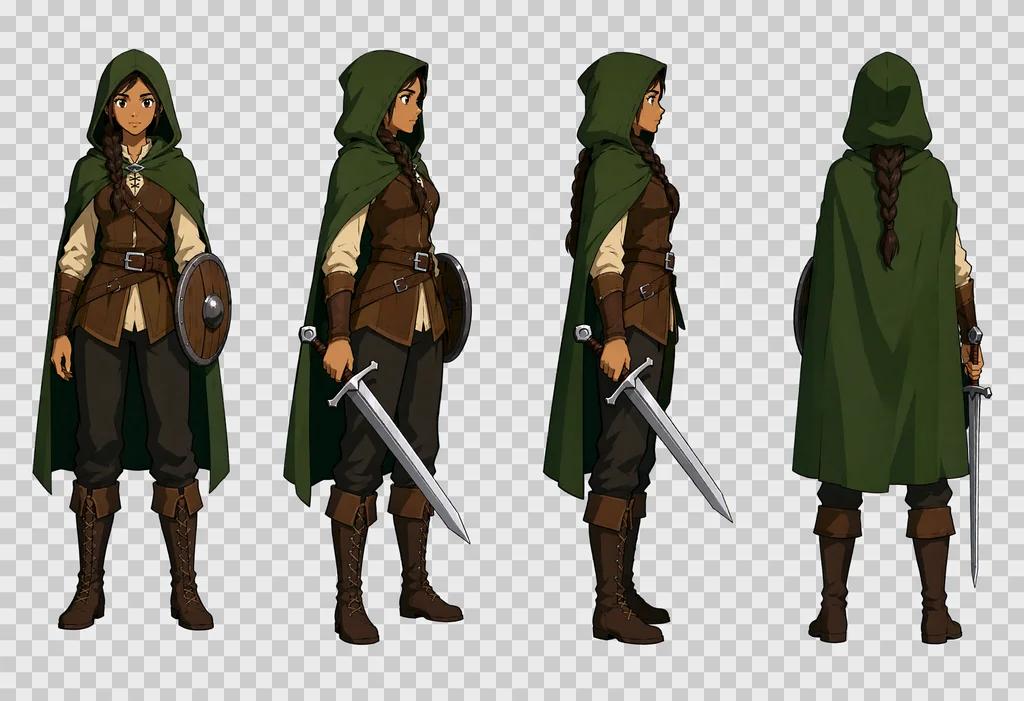
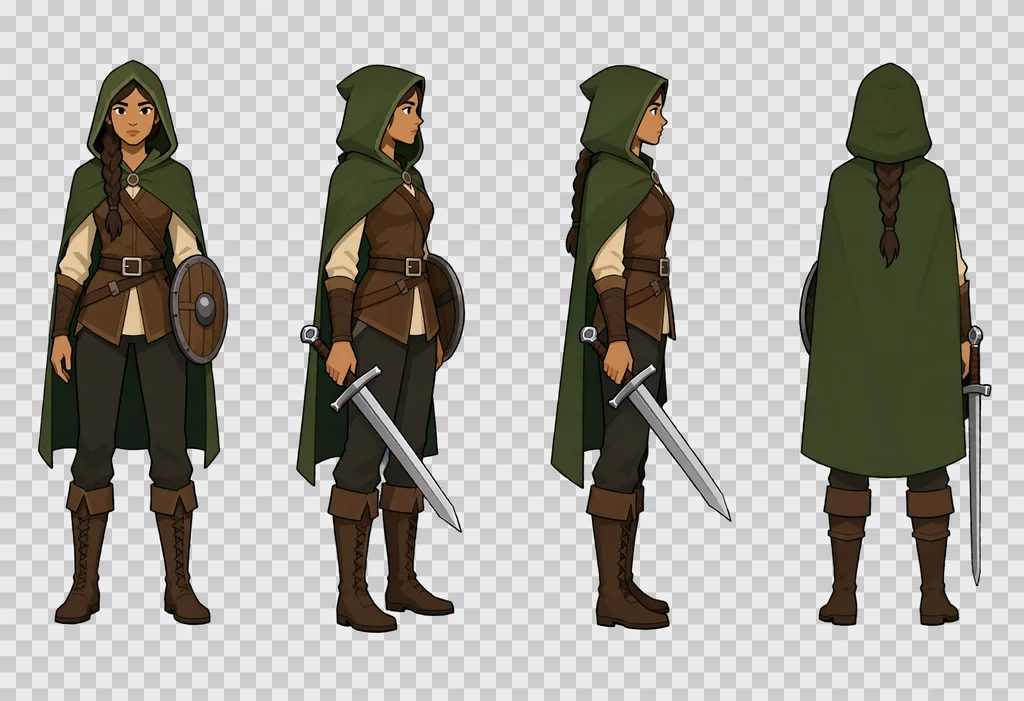
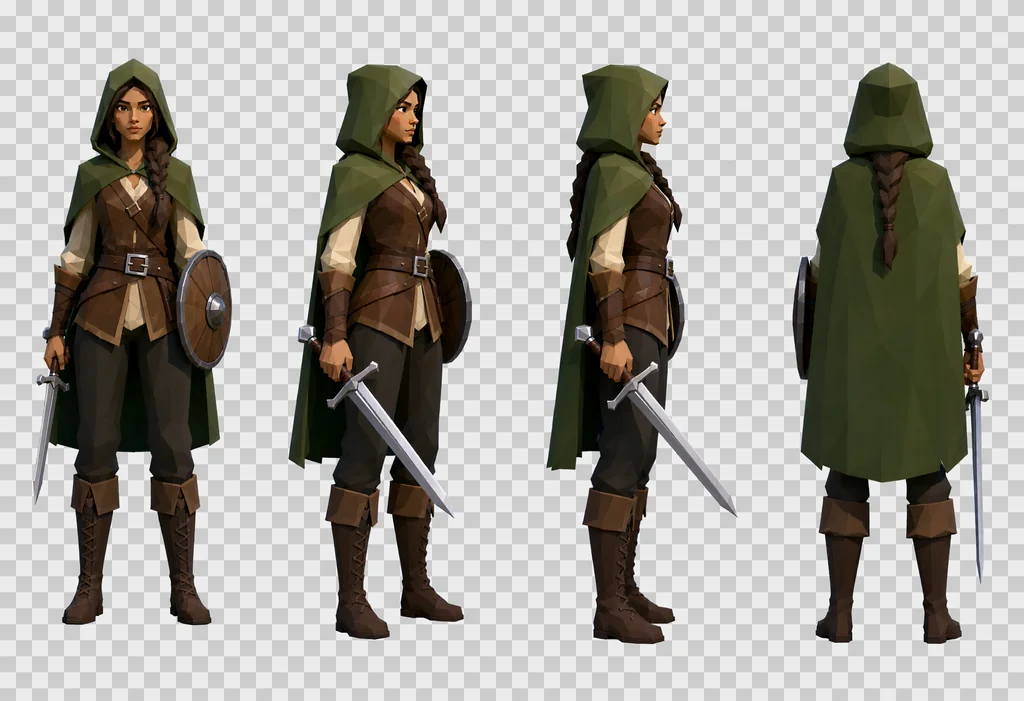
上の4枚のシートでは、キャラクター、衣装、ポーズはブロックを変えても保たれ、変わったのは描画だけです。セット全体で一つのブロックを選んでください。別のブロックで作ったスプライトは、並べても馴染みません。
シートをスプライトに切り分ける
切り出しはアルファチャンネル上で、四つの手順で行います。
- 画像を等しいセルに分割する。
- 各セルで、アルファが32を超えるピクセルのバウンディングボックスを取り、4ピクセルの余白を付ける。
- 24未満のアルファを0にして、ハローを消す。
- 不透明なピクセルが100未満のセルは空として扱う。
次に、各スプライトを用途に応じて配置します。
- 被写体のスプライト:ゲームの基準画像と同じアスペクト比のキャンバスに、足を下端に合わせて。
- オブジェクト:キャンバスの中央に。
- インベントリアイコン:192ピクセルの正方形。長さが幅の1.6倍を超えるオブジェクトは45度回転し、先端を右上に向けます。
- 扉、格子:端から端まで引き伸ばし、アルファを255に固定。扉は望む明るさより2〜4倍暗く出るので、基準に合わせて明るさを揃えます。
被写体が隣のセルにはみ出すと、切り出しで欠けます。プロンプトで「generous empty space between the cells」を求めているのはそのためです。
シームレステクスチャ
モデルは求めても完全なタイルを作らないので、何度かの失敗を経て残った以下の方法で、後から継ぎ目を修復します。
- 1024 × 1024 でテキストから画像。「A seamless tileable texture, top-down flat orthographic close-up of … Even diffuse lighting, no vignette, no perspective.」を使います。
- 画像を幅の半分、高さの半分だけずらす。継ぎ目が十字として中央を通るようになります。
- ずらした画像に強度 0.55 の img2img を、
QwenImageImg2Imgノードでかけます。 - そのパスの中央の十字だけをぼかして残す。継ぎ目の両側96ピクセルを32ピクセルのガウスぼかしで馴染ませ、ずらした元画像に貼り戻します。端は、最初の生成の手つかずの内部のままです。
- 逆方向にずらして戻す。
- 端の両側24ピクセルをミラーブレンド(端を鏡像にして重ね合わせる)して、色の最後の段差、ひいては凹凸の段差を消します。
- 最終画像からノーマルマップとラフネスを導出する。
確認用の指標:向かい合う端どうしの平均差を、タイル内部の平均勾配で割ったものです。1.0 なら、継ぎ目は隣り合うどのピクセルとも変わりません。
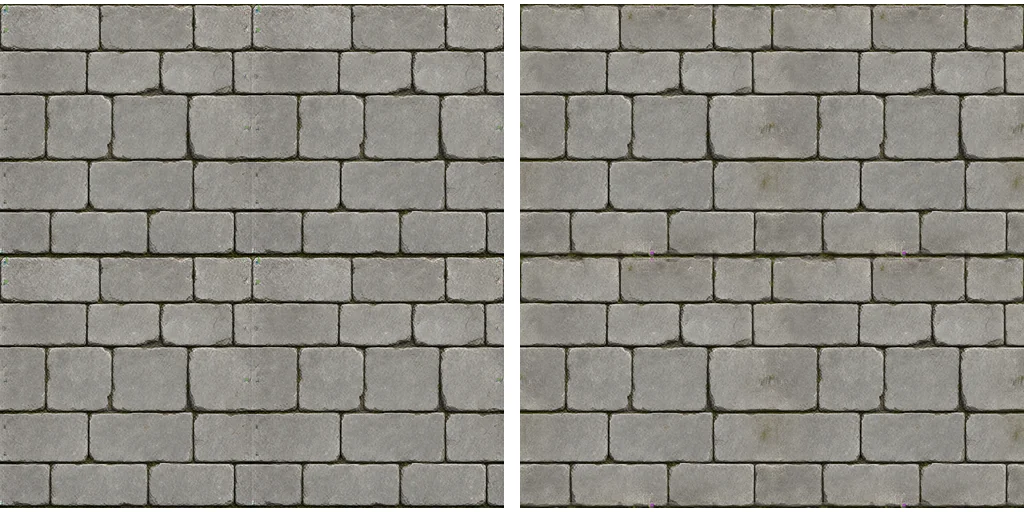
うまくいかなかったこと:
- マスクなしの全面 img2img パス:モデルが自分の端に継ぎ目を作り直します。
- 交互に2回のパス:結果は悪化し、床のテクスチャで 2.07、次に 2.43 になりました。
- 既存の低解像度テクスチャを img2img で描き直す:縞模様になります。テキストから画像でやり直してください。
大きな模様を求めてください。タイルあたりブロック5〜6段です。小さな模様では繰り返しが目立ちます。
やり直す、確認する、繰り返す
- シートの結果は決定論的です。プロンプトとシードが同じなら同じ結果になります。生の PNG と、その横にプロンプトのテキストを保存してください。
- 被写体をやり直すときは、別のシードでシート全体をやり直します。単一のセルだけをやり直すことは決してしません。古いシートは残します。後でより良いポーズを拾えることがあります。
- 描画と切り出しを分ける。切り出しと配置は、ComfyUI を呼ばずに生のシートからやり直せます。
- バッチを再開可能にする。すでにディスクにあるシートは描き直さないので、3時間の実行が中断されても続きから進められます。
スプライトをゲームに入れる前に、三つの確認をする価値があります。
- 明るい背景か市松模様の上で確認する。暗いグレーの上ではいけません。暗い背景はフリンジとハローを隠します。
- ゲーム内のサイズで見る。拡大したものだけではなく。アイコンは32ピクセルで読めなければなりません。
- ゲーム内でスクリーンショットを撮り、スプライトと壁や床の面を見比べます。大きなピクセルでできた壁の上では、HD のスプライトは浮きます。その場合、壁や床の面を同じ水準で作り直す必要があります。
既知の限界
- オブジェクトが写真的になりすぎることがあります。特に金属とガラスです。テキストで個別に直します。
- アクションのセルは最も信頼性の低い部分です。被写体ごとに確認してください。
- 色相がシートごとにずれます。壁が青くなり、扉が暗く出ます。テキストで色を指定し、必要なら後で補正します。
- 混み合ったグリッドでは、モデルがセルを結合したり複製したりすることがあります。最大12セルにとどめ、各セルを行と列で指定してください。
- オブジェクト上の文字や記号、ルーンや銘文は信頼できません。省くか、後から加えてください。
- ライセンス。ウェイトは Qwen Research License の下にあり、研究と評価のみに使えます。商用ゲームに同梱するアセットには、まず Qwen からのライセンスが必要です。ホスティングサービスにはそれぞれ固有の規約があります。
セットの設定を一つの表に:
| 設定 | 値 |
|---|---|
| モデル | Qwen-Image 2.1 ベース、int8 |
| ステップ、CFG | 20、3.0、ネガティブプロンプト付き |
| サンプラー | euler、simple |
| ガイダンス | APG 1.0、10.0、0.3、次に FreSca 1.0、2.0、8 |
| シート | 2432 × 1664、横一列の4セルまたは 4 × 3 のグリッド |
| テクスチャ | 1024 × 1024、固定シード |
| 継ぎ目のパス | img2img 0.55、幅96ピクセルの帯 |
| 端のブレンド | 24ピクセル |