一张图集,而不是每个素材一张图
不要让模型每个精灵单独出一张图,而是要一张图集:一张 400 万像素的图按网格排布,再用脚本把各个单元格切开。
- 一个主体,比如一个角色,就是一张图集,画同一人物的四个视角。
- 一组同类物品,就是一张图集,画八到十二件不同的物品。
- 一件重要道具,比如一把武器,就是一张图集,画这件物品的几个视角。
一张图集有三个好处。
- 一致性。四个视角出自同一次渲染:颜色、服装、武器、光照全都相同。分开渲染四次,得到的是四个不同的角色。
- 统一的风格,同一组物品共用。
- 产量。一张图集四到五分钟,产出四到十二个精灵。
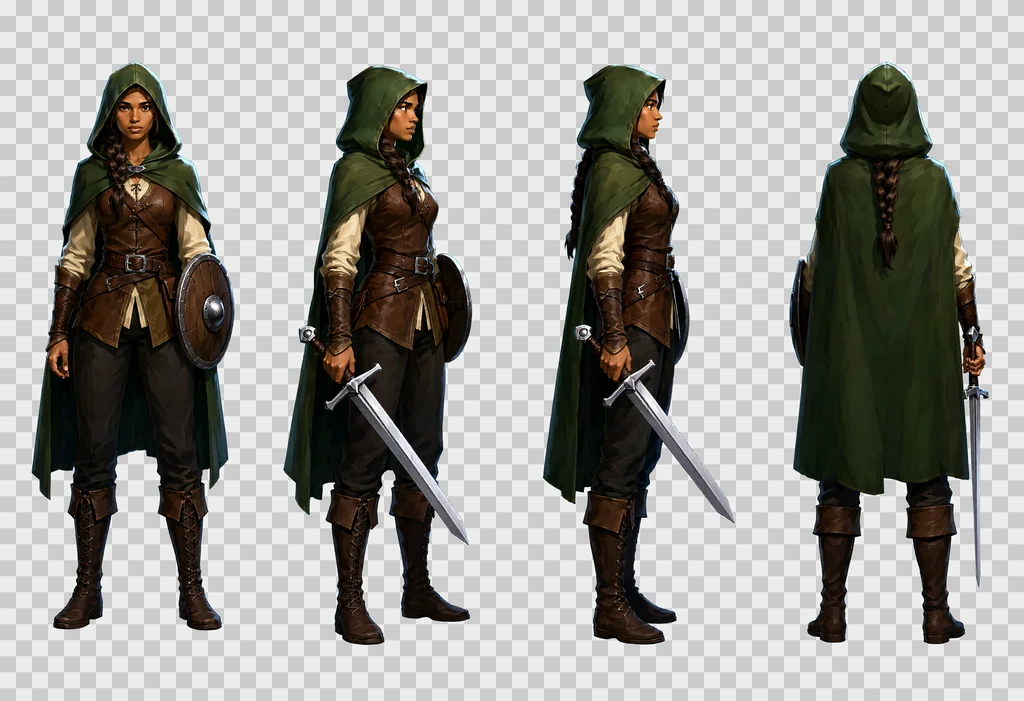
这些图集不只用于游戏。一个角色的转面图可以作为应用原型、漫画或分镜的参考图。它也可以直接作为 Seedance、MiniMax Hailuo 或 Wan 2.2 这类图生视频模型的起始参考图。
下文的一切都是在为一款游戏制作 1000 多个文件的过程中验证过的:角色、物品、特效、道具和贴图。参数沿用 Qwen-Image 2.1 参数指南。
参数与 ComfyUI 工作流
用基础模型而不是 Turbo,CFG 3 配合负面提示词,模型路径上接 APG 和 FreSca。工作流里没有提示词扩写器:提示词原样送入。
| 节点 | 设置 |
|---|---|
| UNETLoader | qwen_image_2.1_int8_convrot.safetensors |
| CLIPLoader | qwen3vl_8b_int8_convrot.safetensors,类型 qwen_image |
| VAELoader | qwen_image_2.1_vae_bf16.safetensors |
| QwenImage21Cache | device auto,dtype int8 |
| APG | eta 1.0,norm threshold 10.0,momentum 0.3 |
| FreSca | scale low 1.0,scale high 2.0,frequency cutoff 8 |
| TextEncodeQwenImage21 | 提示词和负面提示词,分辨率 1024 |
| EmptyLatentImage | 图集 2432 × 1664,贴图 1024 × 1024 |
| KSampler | 20 步,CFG 3.0,euler,simple,denoise 1.0 |
| VAEDecode、SaveImage | PNG 以 RGBA 输出,见下一节 |
模型路径依次是 UNETLoader、QwenImage21Cache、APG、FreSca,然后是 KSampler。在制作这套素材的机器上实测的时间:
| 任务 | 用时 |
|---|---|
| 图集,2432 × 1664,20 步 | 230 到 320 秒 |
| 贴图,1024 × 1024,文生图 | 约 80 秒 |
| 图生图一遍,1024 × 1024 | 约 40 秒 |
参数指南记录过一张 12 GB 显卡用 int8 权重渲染这个尺寸的 400 万像素图像,显存峰值 11.5 GB,所以一张图集应该放得下,前提是显卡上没有别的东西在占用。
通过 API 驱动 ComfyUI 时有两个坑。发给 /prompt 的 JSON 里,参考图要以扁平键传入:"images.image_1": [node, 0]。嵌套写法 "images": {"image_1": …} 不会报错,但参考图会被悄悄忽略。另外,一定要检查收到的 PNG 是否为 RGBA 模式。提示词框架写得不对会得到不透明背景;这时应该抛出错误,而不是直接去切。
原生透明
只要在提示词首尾各加一句固定的话,Qwen-Image 2.1 就能自行生成 Alpha 通道。
- 开头:
This is an RGBA image with transparency. - 结尾:
The image has alpha channel and the background is transparent.
结果是真正的 RGBA PNG。约 1 % 的像素是半透明的,没有色边。这取代了过去用来抠图的洋红背景,那种做法会在轮廓上留下一圈杂边,还得再清理溢色。
在结尾那句后面加上:no ground, no cast shadows, no frames, no text, no labels。不加的话,模型喜欢在每个主体下面画一块阴影或一片地面,这会破坏切图。
怎样写图集提示词
既然没有任何东西替你改写提示词,它就必须又长又精确:这套素材的提示词在 2,500 到 3,000 个字符之间,短提示词只能得到一张视角雷同的糟糕图集。
下面的顺序是实测有效的。请不要打乱。
- 开头的 RGBA 句。
- 主体和网格。“A game character turnaround sheet of one single character, description, drawn four times at exactly the same scale in a strict row of 4 equal cells with generous empty space between the cells, read left to right.”
- 逐格编号描述。“cell 1, … ; cell 2, … ; cell 3, … ; cell 4, …”如果用 4 × 2 网格,还要点明行:“Top row: cell 1, … Bottom row: cell 5, …”
- 身份一致句。“Same character in every cell: identical colours, proportions, costume, weapon and lighting.”
- 风格块,整套素材用同一个。
- 结尾的 RGBA 句。
上面游侠图集的完整提示词:
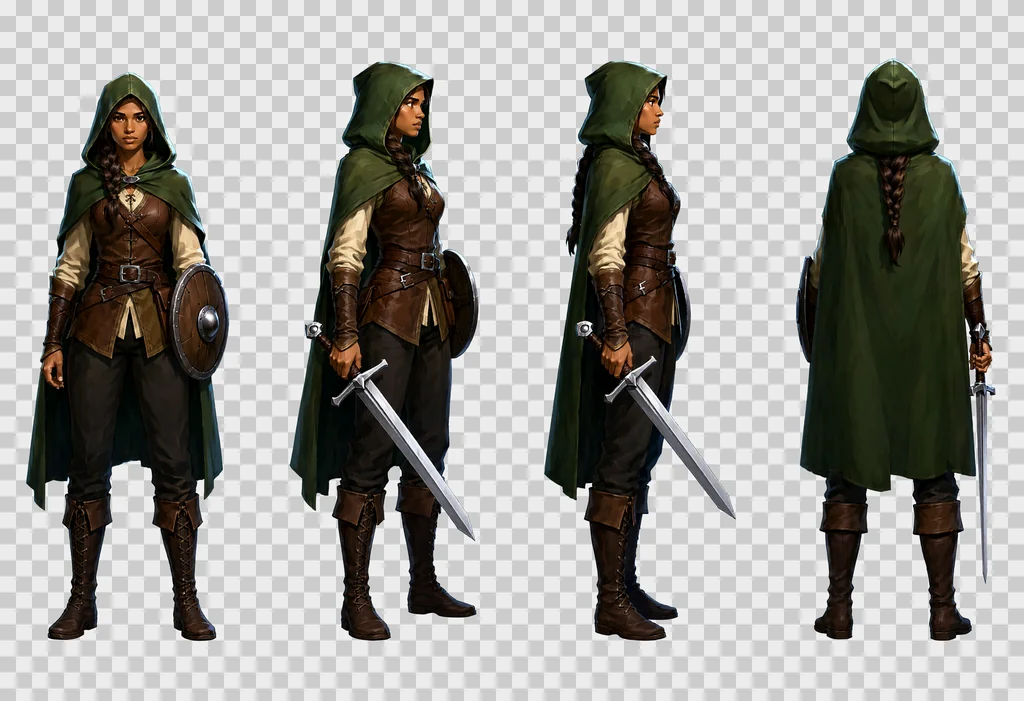
This is an RGBA image with transparency. A game character turnaround sheet of one single character, a young woman ranger in her twenties with light brown skin, a long dark braid over one shoulder, a hooded forest-green cloak, a brown leather jerkin over a cream linen shirt, dark trousers, tall laced boots, a straight one-handed sword with a plain steel crossguard and a leather-wrapped grip held low in her right hand with the point toward the ground, and a small round wooden buckler strapped to her left forearm, drawn four times at exactly the same scale in a strict row of 4 equal cells with generous empty space between the cells, read left to right: cell 1, standing at rest, seen straight from the front, both feet on the same line, face fully visible; cell 2, standing at rest, turned 45 degrees to her right so we see the front and her right side, the sword arm nearest the viewer; cell 3, standing at rest in strict profile, facing right, one eye visible, the braid down her back, the sword in front of her; cell 4, standing at rest seen directly from behind, the back of the hood, the cloak and the braid, the sword hanging point down along her right leg so that exactly one blade shows beside the cloak, no face. Same character in every cell: identical colours, proportions, costume, weapon and lighting. Style: hand-painted game illustration, visible brush strokes, rich material detail, crisp silhouettes, soft frontal light from slightly above, a thin cool rim light, no outline, no motion blur. The image has alpha channel and the background is transparent, no ground, no cast shadows, no frames, no text, no labels.
试验中总结出的规则:
- 描述材质,而不只是物体。“a battle axe: a long straight ash-wood haft and one broad crescent steel blade with a bearded lower edge, the head wedged and riveted, the edge bright and nicked”(一把战斧:长直的白蜡木柄,一片宽阔的新月形钢刃,下缘向下延伸成斧须,斧头楔入柄中并铆接,刃口锃亮带缺口)。
- 按镜头看到的内容描述每个视角,而不是用视角的名称。“seen from a three-quarter back angle, turned 135 degrees so we see its back and its left side, the face hidden”(从四分之三背面看,转了 135 度,能看到背部和左侧,脸被挡住)有效。只写“back three-quarter view”成功率低得多。
- 如果加俯视图,它需要反复强调:镜头垂直向下,只看到头顶和肩膀,没有脸,“like a token on a tactical board game map”(像战棋地图上的一枚棋子)。
- 模型跑偏时,写明不该有什么。一个没有四肢的主体,如果文字写得笼统,在攻击格里会长出爪子和嘴。要写“no arms, no legs, no teeth”。
- 如果加动作格,要为每个主体单独写。一句通用的“the subject attacks”会让整批角色的姿势都很弱。每个主体都要有自己的蓄力和自己的出招:举起的棍棒、一口咬下、喷出火焰、挥出触手。
- 留意会改变渲染方式的词。给背包图标写“bold simplified, strong contrast, clean silhouette”,结果是一个黑白的图形符号。想要彩色图标,就写“in full colour, painted with exactly the same rich materials as cell 1”。
- 整套素材用一个风格块,让主体、物品和道具处于同一个世界。这套素材的风格块就在上面的提示词里:手绘游戏插画,可见笔触,材质细节,清晰的剪影,来自正前方略偏上的柔和光,冷色轮廓光,无描边,无运动模糊。
这套素材的负面提示词:
artifacts, washed-out colors, low quality, low resolution, blurry, extra fingers, missing fingers, deformed hands, bad anatomy, extra limbs, text, watermark, signature, labels, captions, letters, numbers, cast shadow, ground, floor, gradient background, frame, border lines, photo, 3d render
图集模板
所有图集都是 2432 × 1664 像素。
单一主体:一行 4 格,一个角色
| 单元格 | 视角 |
|---|---|
| 1 | 静止,正面 |
| 2 | 静止,四分之三正面 |
| 3 | 静止,正侧面 |
| 4 | 静止,背面 |
一行四个视角是每次测试都稳定成立的布局:格子高,人物大,每个视角里的武器都画得对。带俯视图和两个动作格的 4 × 2 网格也可以,但多出的这四格正是图集出错的地方:背面视角里多出第二把刀,俯视图里剑的位置不对,出招时手画得怪。需要时再加,并逐格检查。
同类物品:4 × 3 或 4 × 2,不同物品
每格一行:“Cell 5, row 2 column 1: description.”长条形物品加上“lying horizontally across the cell, pointing to the right”(横放在格子里,指向右侧),让它填满格子。结尾写:“Exactly one object per cell, N objects in all, no duplicates, no object crossing into another cell, each object drawn large enough to fill most of its cell.”
每张图集十二件物品,是这套素材中用过的最大数量。再多,格子就太小了。
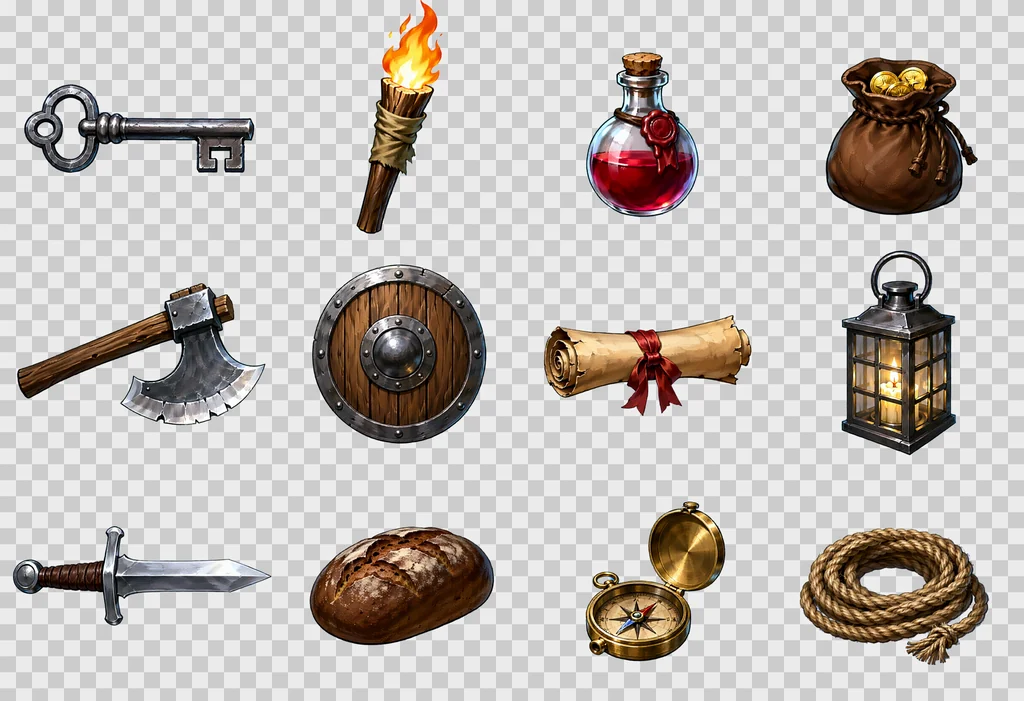
这张图集的完整提示词:
This is an RGBA image with transparency. A game item sheet of twelve different dungeon objects, each drawn large in its own cell of a strict 4 by 3 grid of equal cells with generous empty space between the cells, read left to right then top to bottom. Cell 1, row 1 column 1: an iron key with a looped bow and two square teeth, lying horizontally across the cell, pointing to the right. Cell 2, row 1 column 2: a wooden torch, a split oak stick wrapped in tarred cloth, the flame burning upward. Cell 3, row 1 column 3: a small red health potion, a round glass flask with a cork stopper and a wax seal. Cell 4, row 1 column 4: a leather coin pouch, drawstring closed, bulging, two gold coins showing at the mouth. Cell 5, row 2 column 1: a battle axe, a long straight ash-wood haft and one broad crescent steel blade with a bearded lower edge, the head wedged and riveted, the edge bright and nicked, lying horizontally across the cell, pointing to the right. Cell 6, row 2 column 2: a round wooden shield with an iron rim and a central iron boss, three planks visible, seen straight on. Cell 7, row 2 column 3: a rolled parchment scroll tied with a red ribbon, lying horizontally across the cell, pointing to the right. Cell 8, row 2 column 4: a lantern, a square iron frame with four glass panes and a ring handle, a candle glowing inside. Cell 9, row 3 column 1: a short sword with a plain crossguard, a leather-wrapped grip and a round pommel, lying horizontally across the cell, pointing to the right. Cell 10, row 3 column 2: a loaf of dark rye bread with a cracked crust. Cell 11, row 3 column 3: a brass compass in an open round case, the needle visible. Cell 12, row 3 column 4: a coil of hemp rope with a frayed end. Exactly one object per cell, twelve objects in all, no duplicates, no object crossing into another cell, each object drawn large enough to fill most of its cell. Style: hand-painted game illustration, visible brush strokes, rich material detail, crisp silhouettes, soft frontal light from slightly above, a thin cool rim light, no outline, no motion blur. The image has alpha channel and the background is transparent, no ground, no cast shadows, no frames, no text, no labels.
道具与特效:4 × 2 或 4 × 3
道具:“dungeon fixtures seen straight on from the front”(正面平视的地牢固定陈设),光照均匀。特效:“glowing, with soft luminous edges”(发光,边缘柔和明亮)。投射物:“flying to the right”(向右飞行)。
单件物品多视角:一行 4 格
四个格子都是同一件物品:正面基础视图、平放在地上的俯视图、彩色背包图标、双色动作图标。投掷视角可以加在第二行;第一批弯刀和斧头的系列,透视缩短效果令人信服,包括刃口正对镜头的斧头,但正对镜头飞来的投掷武器是最常失败的一格。这是这套素材里最新的模板,仍在检验中。
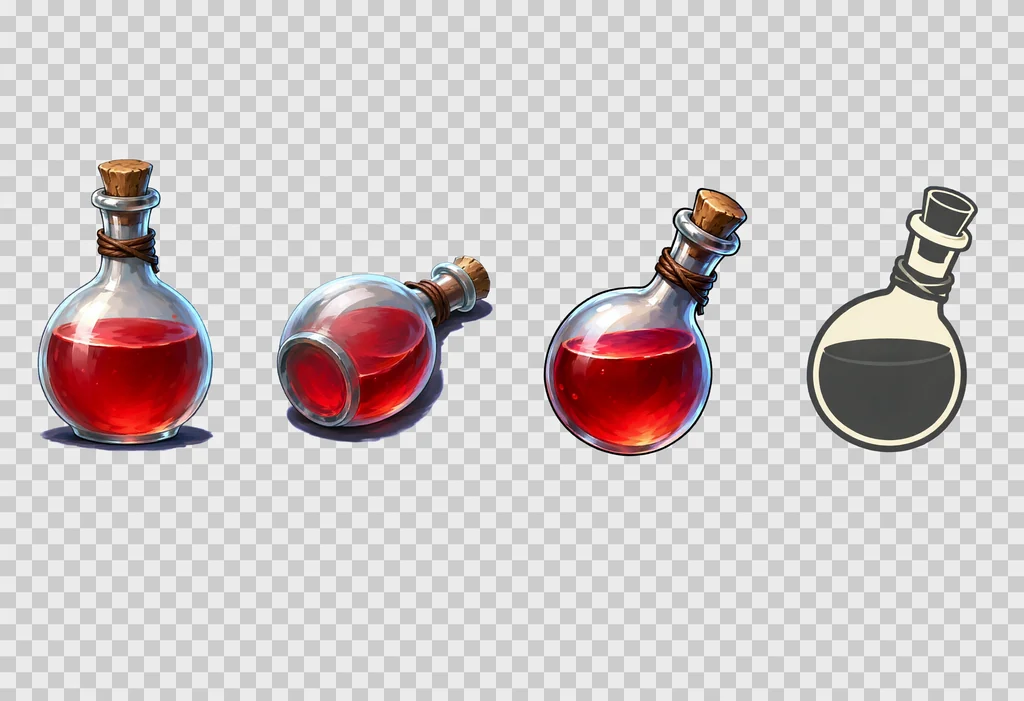
同一套配方,换成其他风格
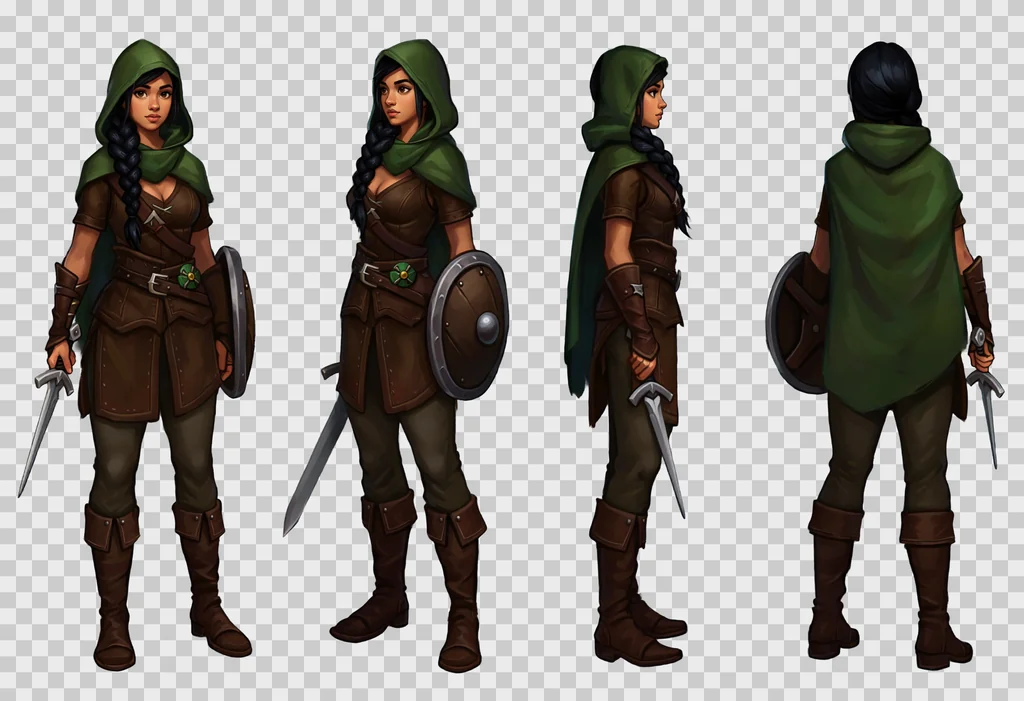
网格、各格文字和 RGBA 框架都不依赖风格。只有风格块会变。下面的图集来自游侠提示词,只是把风格块换成了以下之一:
- 像素风。
Style: 16-bit pixel art, a visible pixel grid, flat colours with two or three shades per material, hard pixel edges, a one-pixel dark outline, no anti-aliasing, no gradients. - 动漫。
Style: anime cel shading, clean dark line art, flat colours with one hard shadow tone, small bright highlights, a saturated palette, soft frontal light. - 扁平矢量。
Style: flat vector illustration, simple geometric shapes, no gradients, no texture, a limited palette of six colours, thick uniform outlines, soft frontal light. - 低多边形。
Style: low poly 3D render look, visible flat triangular facets, matte materials, no texture detail, soft studio light from the front and above.
用低多边形风格块时,要把“3d render”从负面提示词里去掉,否则两条指令会互相冲突。
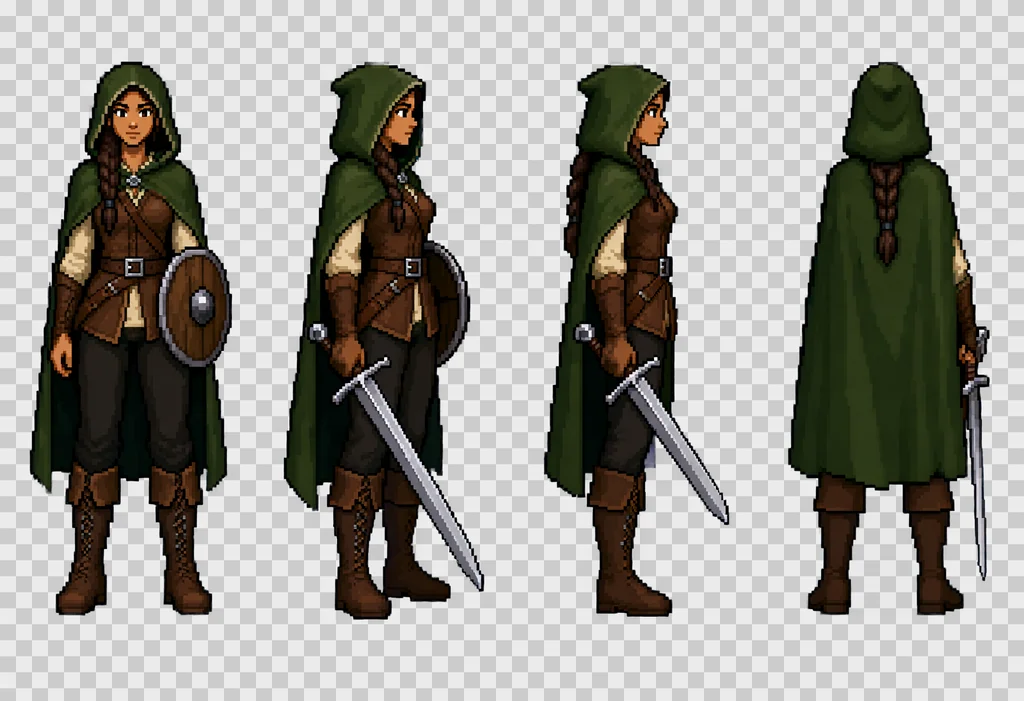
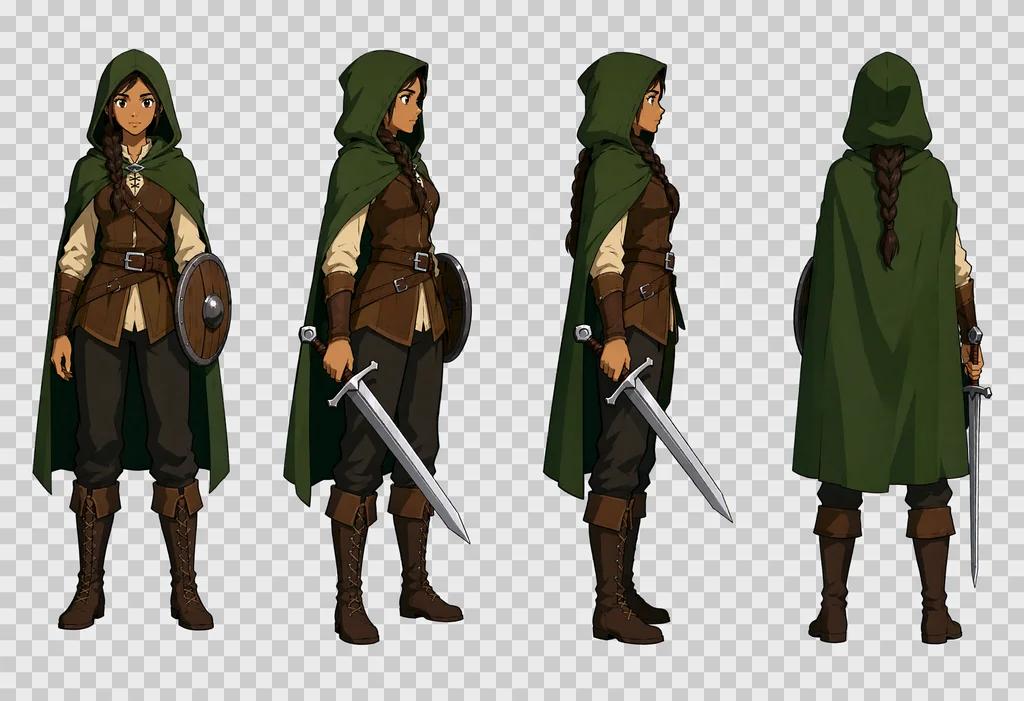
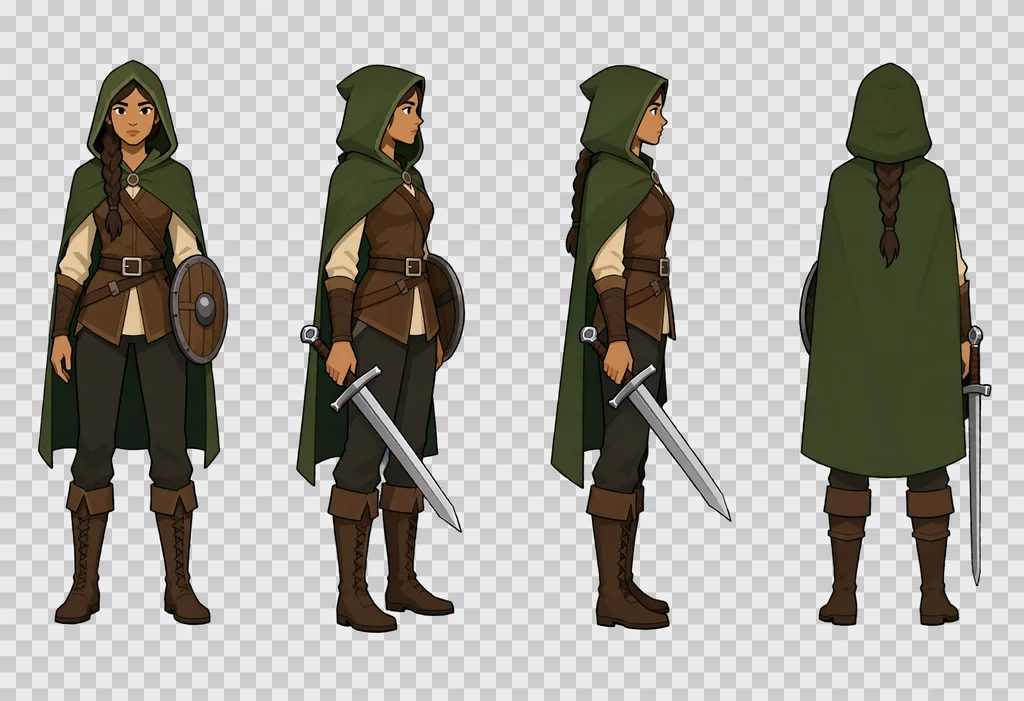
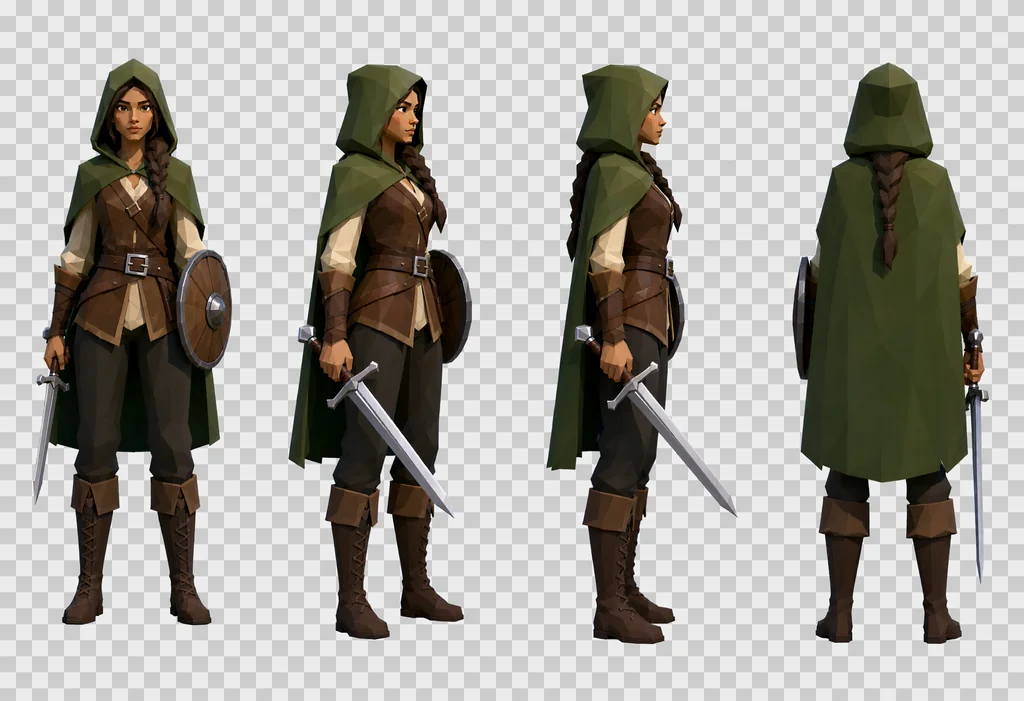
上面四张图集里,角色、她的服装和姿势从一个风格块到下一个都保持不变,只有渲染方式变了。一整套素材只选一个风格块。不同风格块做出的精灵放在一起不搭。
把图集切成精灵
切图基于 Alpha 通道,分四步。
- 把图像划分成大小相等的单元格。
- 在每个格子里,取 Alpha 高于 32 的像素的外接矩形,外加 4 像素边距。
- 把 Alpha 低于 24 的像素置零,去掉光晕。
- 不透明像素少于 100 的格子视为空格。
然后按用途摆放每个精灵。
- 主体精灵:放进与游戏参考图同宽高比的画布,脚贴底边。
- 物品:在画布中居中。
- 背包图标:192 像素的正方形。长度超过宽度 1.6 倍的物品旋转 45 度,尖端朝右上。
- 门、铁栅:拉伸到边贴边,Alpha 强制为 255。门渲染出来比想要的暗两到四倍,所以要按参考图校正亮度。
如果主体伸进了相邻格子,切图会把它截断。这就是提示词要求“generous empty space between the cells”(格子之间留出充足空白)的原因。
无缝贴图
即使明确要求,模型也做不出能完美平铺的贴图,所以下面这套经过几次失败后保留下来的方法,是在事后修复接缝。
- 以 1024 × 1024 文生图,提示词写“A seamless tileable texture, top-down flat orthographic close-up of … Even diffuse lighting, no vignette, no perspective.”
- 把图像平移半个宽度和半个高度。接缝现在穿过正中,呈十字形。
- 对平移后的图做强度 0.55 的图生图,使用
QwenImageImg2Img节点。 - 只保留这一遍结果中柔化过的中央十字,接缝两侧各 96 像素,加 32 像素高斯模糊,贴回平移后的原图。四边仍然是第一次渲染未经改动的内部区域。
- 反向平移回去。
- 在边缘两侧各做 24 像素的镜像混合,消除最后残留的颜色跳变,连带消除起伏上的跳变。
- 从最终图像推导法线贴图和粗糙度贴图。
检验指标:对边之间的平均差值除以贴图内部的平均梯度。等于 1.0 时,接缝与任何相邻像素没有区别。
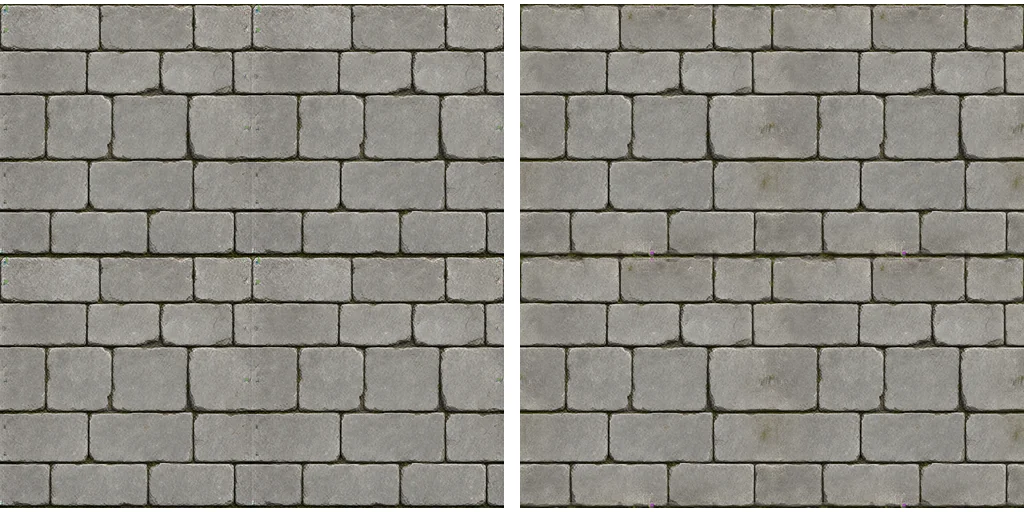
无效的做法:
- 不加遮罩的整图图生图:模型会在自己的边缘重新造出接缝。
- 交替做两遍:结果变差,地面贴图从 2.07 变成 2.43。
- 用图生图重绘一张已有的低分辨率贴图:得到条纹状结果。应从文生图重新开始。
要求大图案,每块贴图五到六层砖。小图案会让重复一眼可见。
重做、检查、迭代
- 图集是确定的:给定提示词和种子,结果就固定。把原始 PNG 和提示词文本放在一起保存。
- 重做某个主体时,换一个种子重画整张图集,绝不单独重画一格。保留旧图集:以后可能从中挑出更好的姿势。
- 把绘制和切图分开。切图和摆放可以从原始图集重新运行,不必再调用 ComfyUI。
- 让批处理可续跑。磁盘上已有的图集不再重画,这样三小时的任务中断后也不会白费。
精灵进游戏前,有三项检查值得做。
- 在浅色背景或棋盘格上审看,不要用深灰。深色背景会掩盖色边和光晕。
- 按游戏内尺寸看,不要只看放大图。图标在 32 像素下必须仍然可辨认。
- 在游戏里截一张图,对照场景表面检查精灵。高清精灵放在大像素块的墙上会不协调。那样表面就得按同样的精度重做。
已知限制
- 物品有时过于照片化,金属和玻璃尤其如此。在文字里逐个修正。
- 动作格是最不可靠的部分。逐个主体检查。
- 色相在不同图集之间漂移:墙变蓝,门发暗。在文字里固定颜色,必要时事后校正。
- 网格太挤时,模型会合并或重复格子。最多十二格,并用行和列命名每个格子。
- 物品上的文字和符号,比如符文或铭文,不可靠。省掉它们,或者事后再加。
- 许可证。权重采用 Qwen Research License:仅限研究和评估。要把素材放进商业游戏,必须先向 Qwen 取得许可;托管服务也有自己的条款。
这套素材的参数汇总成一张表:
| 参数 | 值 |
|---|---|
| 模型 | Qwen-Image 2.1 基础版,int8 |
| 步数、CFG | 20,3.0 配合负面提示词 |
| 采样器 | euler,simple |
| 引导 | 先 APG 1.0、10.0、0.3,再 FreSca 1.0、2.0、8 |
| 图集 | 2432 × 1664,一行 4 格或 4 × 3 网格 |
| 贴图 | 1024 × 1024,固定种子 |
| 接缝修复 | 强度 0.55 的图生图,96 像素宽的条带 |
| 边缘混合 | 24 像素 |