ทำทีละ sheet ไม่ใช่ทีละ asset
แทนที่จะขอให้โมเดลสร้างภาพทีละ sprite ให้ขอเป็น sheet เดียว: ภาพ 4 ล้านพิกเซลภาพเดียวที่จัดวางเป็นกริด แล้วใช้สคริปต์ตัดแต่ละช่องออกจากกันภายหลัง
- ตัวแบบหนึ่งตัว เช่นตัวละคร คือ sheet เดียวที่มีสี่มุมมองของร่างเดียวกัน
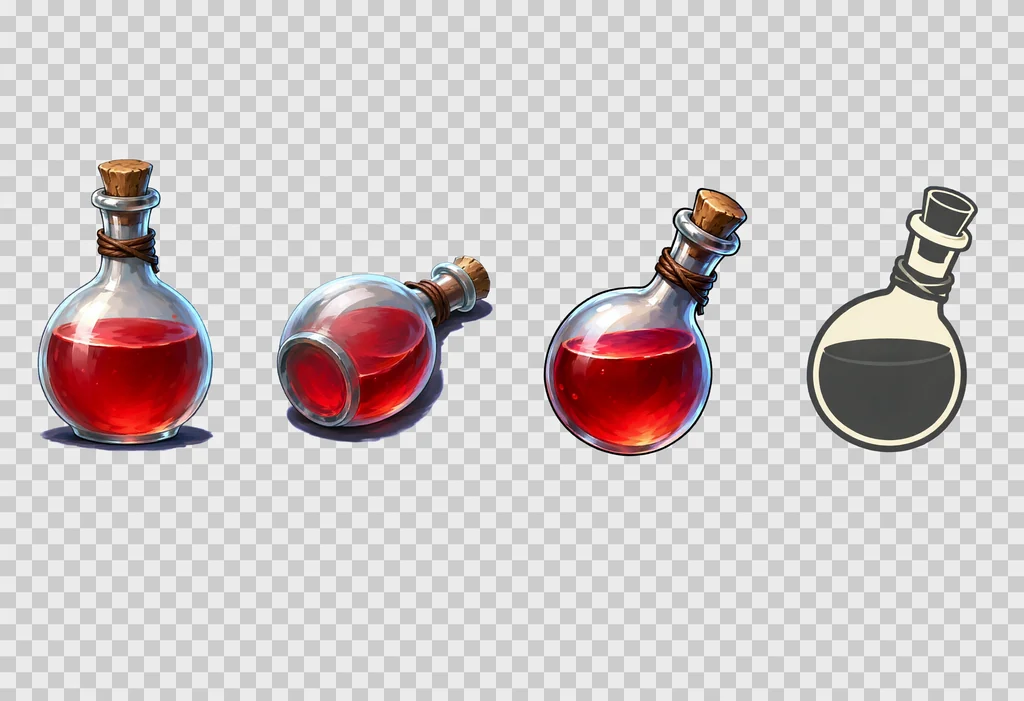
- วัตถุหนึ่งตระกูล คือ sheet เดียวที่มีวัตถุต่างกันแปดถึงสิบสองชิ้น
- ไอเทมสำคัญ เช่นอาวุธ คือ sheet เดียวที่มีไอเทมนั้นหลายมุมมอง
sheet ให้สามอย่าง
- ความสม่ำเสมอ ทั้งสี่มุมมองมาจากการเรนเดอร์ครั้งเดียวกัน: สีเดียวกัน เครื่องแต่งกายเดียวกัน อาวุธเดียวกัน แสงเดียวกัน การเรนเดอร์แยกสี่ครั้งให้ตัวละครสี่ตัวที่ต่างกัน
- สไตล์เดียว ที่วัตถุทุกชิ้นในตระกูลใช้ร่วมกัน
- ปริมาณงาน sheet หนึ่งแผ่นใช้เวลาสี่ถึงห้านาที และได้ sprite สี่ถึงสิบสองตัว
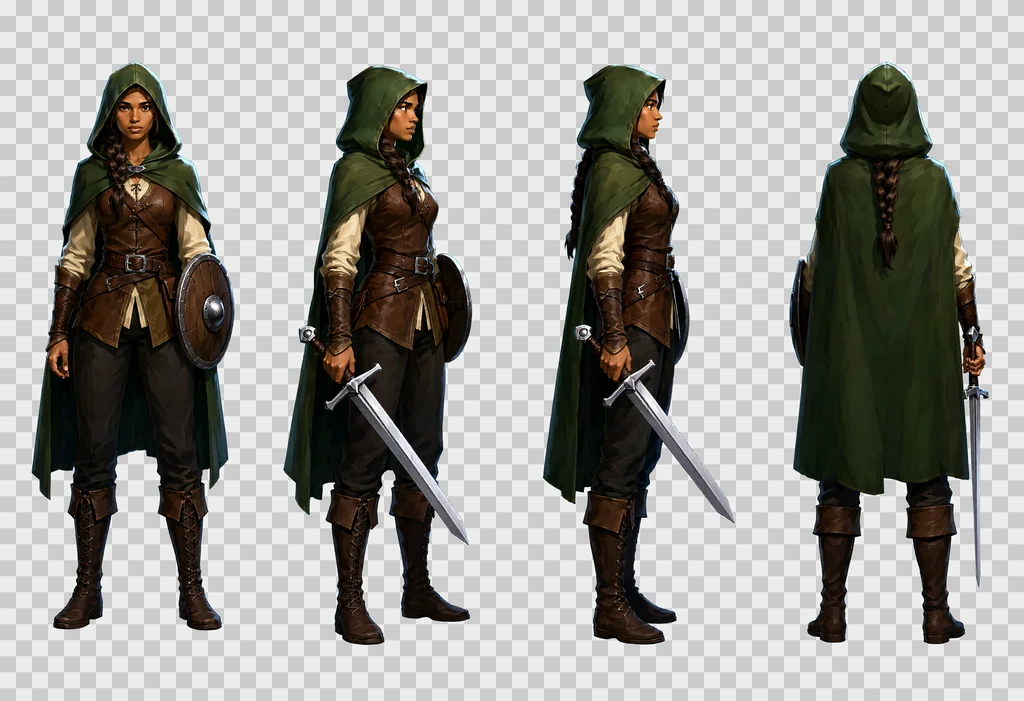
sheet ไม่ได้มีไว้สำหรับเกมเท่านั้น turnaround ของตัวละครใช้เป็นภาพอ้างอิงสำหรับ mock-up ของแอป การ์ตูน หรือ storyboard ได้ และยังเป็นภาพอ้างอิงแบบที่โมเดล image-to-video อย่าง Seedance, MiniMax Hailuo หรือ Wan 2.2 รับเป็นจุดเริ่มต้นได้
ทุกอย่างด้านล่างผ่านการตรวจสอบระหว่างผลิตชุดไฟล์กว่า 1000 ไฟล์: ตัวละคร ไอเทม เอฟเฟกต์ prop และ texture สำหรับเกมหนึ่งเกม การตั้งค่าเป็นไปตามคู่มือการตั้งค่า Qwen-Image 2.1
การตั้งค่าและกราฟ ComfyUI
ใช้โมเดลฐานแทน Turbo ที่ CFG 3 พร้อม negative prompt และใส่ APG กับ FreSca บนเส้นทางของโมเดล ในกราฟไม่มี prompt upsampler: prompt เข้าไปตามที่เขียน
| โหนด | การตั้งค่า |
|---|---|
| UNETLoader | qwen_image_2.1_int8_convrot.safetensors |
| CLIPLoader | qwen3vl_8b_int8_convrot.safetensors, ชนิด qwen_image |
| VAELoader | qwen_image_2.1_vae_bf16.safetensors |
| QwenImage21Cache | device auto, dtype int8 |
| APG | eta 1.0, norm threshold 10.0, momentum 0.3 |
| FreSca | scale low 1.0, scale high 2.0, frequency cutoff 8 |
| TextEncodeQwenImage21 | prompt และ negative prompt, resolution 1024 |
| EmptyLatentImage | 2432 × 1664 สำหรับ sheet, 1024 × 1024 สำหรับ texture |
| KSampler | 20 step, CFG 3.0, euler, simple, denoise 1.0 |
| VAEDecode, SaveImage | PNG ออกมาเป็น RGBA ดูหัวข้อถัดไป |
เส้นทางของโมเดลไล่จาก UNETLoader ไป QwenImage21Cache, APG, FreSca แล้วจึง KSampler เวลาที่วัดบนเครื่องที่ผลิตชุดนี้:
| งาน | เวลา |
|---|---|
| sheet, 2432 × 1664, 20 step | 230 ถึง 320 วินาที |
| texture, 1024 × 1024, text to image | ราว 80 วินาที |
| รอบ image-to-image, 1024 × 1024 | ราว 40 วินาที |
คู่มือการตั้งค่าบันทึกไว้ว่าการ์ด 12 GB เรนเดอร์ภาพ 4 ล้านพิกเซลขนาดนี้ได้โดยใช้หน่วยความจำวิดีโอสูงสุด 11.5 GB บน weights แบบ int8 ดังนั้น sheet น่าจะพอดี หากไม่มีอย่างอื่นใช้การ์ดร่วมอยู่
กับดักสองอย่างหากสั่ง ComfyUI ผ่าน API ของมัน ใน JSON ที่ส่งไป /prompt ภาพอ้างอิงต้องส่งเป็นคีย์แบบแบน: "images.image_1": [node, 0] รูปแบบซ้อนกัน "images": {"image_1": …} จะถูกรับโดยไม่มี error แต่ภาพอ้างอิงถูกมองข้ามเงียบ ๆ และให้ตรวจเสมอว่า PNG ที่ได้รับอยู่ในโหมด RGBA prompt ที่ครอบไม่ถูกต้องจะให้พื้นหลังทึบ ให้โยน error แทนที่จะตัดภาพนั้น
ความโปร่งใสแบบ native
Qwen-Image 2.1 สร้าง alpha channel ได้เอง เพียงครอบ prompt ด้วยสองประโยค
- เปิด:
This is an RGBA image with transparency. - ปิด:
The image has alpha channel and the background is transparent.
ผลลัพธ์คือ PNG แบบ RGBA จริง พิกเซลกึ่งโปร่งใสมีราว 1 % และไม่มีขอบสีเหลื่อม วิธีนี้มาแทนพื้นหลังสีม่วงแดงแบบเก่าที่ต้องคีย์ออก ซึ่งทิ้งขอบไว้และต้องตามเก็บสีที่เลอะ
เติมท้ายประโยคปิดว่า no ground, no cast shadows, no frames, no text, no labels ถ้าไม่ใส่ โมเดลชอบวางเงาหรือหย่อมพื้นใต้ตัวแบบแต่ละตัว ซึ่งทำให้การตัดพัง
วิธีเขียน prompt สำหรับ sheet
เมื่อไม่มีอะไรเขียน prompt ใหม่ให้ prompt จึงต้องยาวและแม่นยำ: prompt ของชุดนี้ยาว 2,500 ถึง 3,000 ตัวอักษร prompt สั้นให้ sheet ที่แย่และมุมมองดูคล้ายกันหมด
ลำดับด้านล่างคือลำดับที่ได้ผล รักษาไว้
- ประโยค RGBA เปิด
- ตัวแบบและกริด "A game character turnaround sheet of one single character, description, drawn four times at exactly the same scale in a strict row of 4 equal cells with generous empty space between the cells, read left to right."
- ช่องทีละช่อง ใส่หมายเลข "cell 1, … ; cell 2, … ; cell 3, … ; cell 4, …" บนกริด 4 คูณ 2 ให้ระบุแถวด้วย: "Top row: cell 1, … Bottom row: cell 5, …"
- ประโยคยืนยันว่าเป็นตัวเดียวกัน "Same character in every cell: identical colours, proportions, costume, weapon and lighting."
- บล็อกสไตล์ ใช้ชุดเดียวกันทั้งชุด
- ประโยค RGBA ปิด
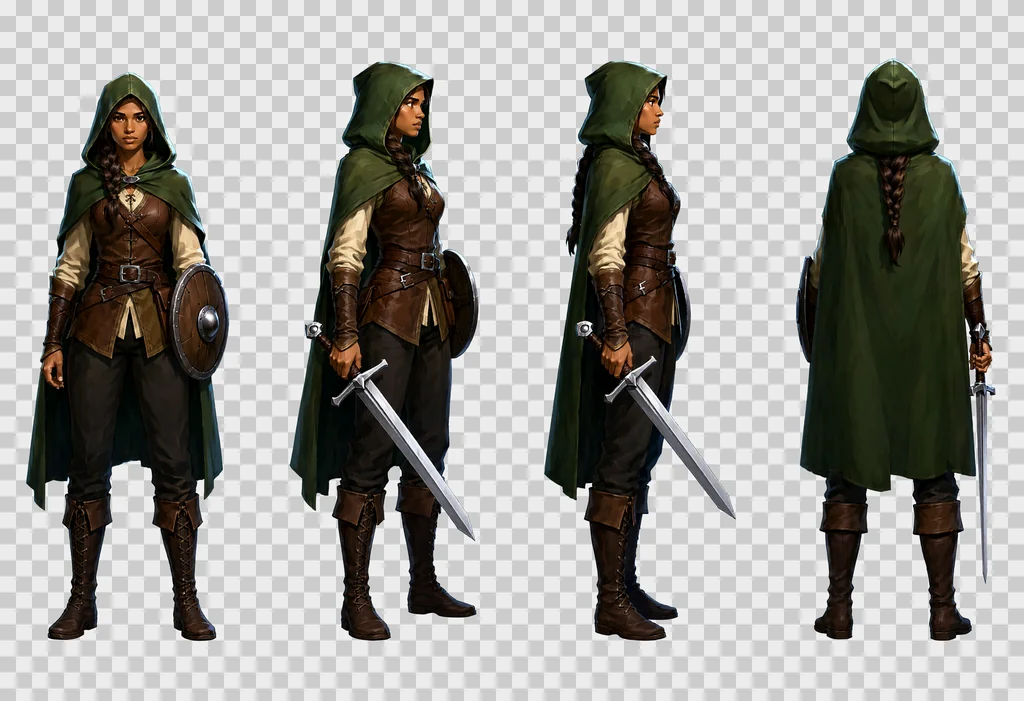
prompt เต็มของ sheet เรนเจอร์ด้านบน:
This is an RGBA image with transparency. A game character turnaround sheet of one single character, a young woman ranger in her twenties with light brown skin, a long dark braid over one shoulder, a hooded forest-green cloak, a brown leather jerkin over a cream linen shirt, dark trousers, tall laced boots, a straight one-handed sword with a plain steel crossguard and a leather-wrapped grip held low in her right hand with the point toward the ground, and a small round wooden buckler strapped to her left forearm, drawn four times at exactly the same scale in a strict row of 4 equal cells with generous empty space between the cells, read left to right: cell 1, standing at rest, seen straight from the front, both feet on the same line, face fully visible; cell 2, standing at rest, turned 45 degrees to her right so we see the front and her right side, the sword arm nearest the viewer; cell 3, standing at rest in strict profile, facing right, one eye visible, the braid down her back, the sword in front of her; cell 4, standing at rest seen directly from behind, the back of the hood, the cloak and the braid, the sword hanging point down along her right leg so that exactly one blade shows beside the cloak, no face. Same character in every cell: identical colours, proportions, costume, weapon and lighting. Style: hand-painted game illustration, visible brush strokes, rich material detail, crisp silhouettes, soft frontal light from slightly above, a thin cool rim light, no outline, no motion blur. The image has alpha channel and the background is transparent, no ground, no cast shadows, no frames, no text, no labels.
กฎที่ได้จากการทดลอง:
- บรรยายวัสดุ ไม่ใช่แค่ตัววัตถุ "a battle axe: a long straight ash-wood haft and one broad crescent steel blade with a bearded lower edge, the head wedged and riveted, the edge bright and nicked"
- บรรยายแต่ละมุมมองด้วยสิ่งที่กล้องเห็น ไม่ใช่ด้วยชื่อมุม "seen from a three-quarter back angle, turned 135 degrees so we see its back and its left side, the face hidden" ใช้ได้ ส่วน "back three-quarter view" เดี่ยว ๆ ได้ผลน้อยกว่ามาก
- มุมบน ถ้าเพิ่มเข้ามา ต้องย้ำ: กล้องชี้ลงตรง ๆ เห็นเฉพาะส่วนบนของศีรษะกับไหล่ ไม่เห็นหน้า "like a token on a tactical board game map"
- บอกสิ่งที่ต้องไม่มีเมื่อโมเดลเริ่มเพี้ยน ตัวแบบที่ไม่มีแขนขาจะงอกกรงเล็บและปากในช่องโจมตีถ้าข้อความกว้างเกินไป ให้เขียน "no arms, no legs, no teeth"
- ช่องท่าโจมตี ถ้าเพิ่มเข้ามา ให้เขียนแยกสำหรับแต่ละตัวแบบ ข้อความกลางแบบ "the subject attacks" ให้ท่าอ่อนทั้งชุดตัวละคร แต่ละตัวต้องมีท่าง้างและท่าฟาดของตัวเอง: กระบองที่ยกขึ้น การกัด การพ่นไฟ การฟาดหนวด
- ระวังคำที่เปลี่ยนการเรนเดอร์ "bold simplified, strong contrast, clean silhouette" สำหรับไอคอนช่องเก็บของให้ pictogram ขาวดำ ถ้าต้องการไอคอนสี ให้เขียน "in full colour, painted with exactly the same rich materials as cell 1"
- บล็อกสไตล์เดียวทั้งชุด ทำให้ตัวแบบ วัตถุ และ prop อยู่ในโลกเดียวกัน บล็อกของชุดนี้อยู่ใน prompt ด้านบน: ภาพประกอบเกมแบบวาดมือ ฝีแปรงเห็นชัด รายละเอียดวัสดุ ซิลูเอตคมชัด แสงนุ่มจากด้านหน้าเฉียงบนเล็กน้อย rim light โทนเย็น ไม่มีเส้นขอบ ไม่มี motion blur
negative prompt ของชุดนี้:
artifacts, washed-out colors, low quality, low resolution, blurry, extra fingers, missing fingers, deformed hands, bad anatomy, extra limbs, text, watermark, signature, labels, captions, letters, numbers, cast shadow, ground, floor, gradient background, frame, border lines, photo, 3d render
เทมเพลต sheet
sheet ทั้งหมดมีขนาด 2432 × 1664 พิกเซล
ตัวแบบเดียว: แถวเดียว 4 ช่อง ตัวละครหนึ่งตัว
| ช่อง | มุมมอง |
|---|---|
| 1 | ยืนพัก ด้านหน้า |
| 2 | ยืนพัก สามส่วนสี่ด้านหน้า |
| 3 | ยืนพัก ด้านข้างตรง |
| 4 | ยืนพัก ด้านหลัง |
สี่มุมมองเรียงเป็นแถวเดียวคือผังที่ยืนระยะได้ในทุกการทดสอบ: ช่องสูง ร่างใหญ่ และอาวุธวาดถูกต้องในทุกมุมมอง กริด 4 คูณ 2 ที่เพิ่มมุมบนกับช่องท่าโจมตีสองช่องก็ใช้ได้ แต่สี่ช่องที่เพิ่มมานั้นคือจุดที่ sheet พัง: ใบดาบเล่มที่สองในมุมด้านหลัง ดาบวางผิดที่ในมุมบน มือแปลก ๆ ในท่าฟาด เพิ่มเมื่อจำเป็น และตรวจทีละช่อง
ตระกูลวัตถุ: 4 คูณ 3 หรือ 4 คูณ 2 วัตถุต่างกัน
หนึ่งบรรทัดต่อช่อง: "Cell 5, row 2 column 1: description." วัตถุทรงยาวให้เติม "lying horizontally across the cell, pointing to the right" (วางนอนขวางช่อง ปลายชี้ไปทางขวา) เพื่อให้เต็มช่อง ปิดท้ายด้วย: "Exactly one object per cell, N objects in all, no duplicates, no object crossing into another cell, each object drawn large enough to fill most of its cell."
สิบสองชิ้นต่อ sheet คือจำนวนมากที่สุดที่ใช้ในชุดนี้ เกินกว่านั้นช่องจะเล็กเกินไป
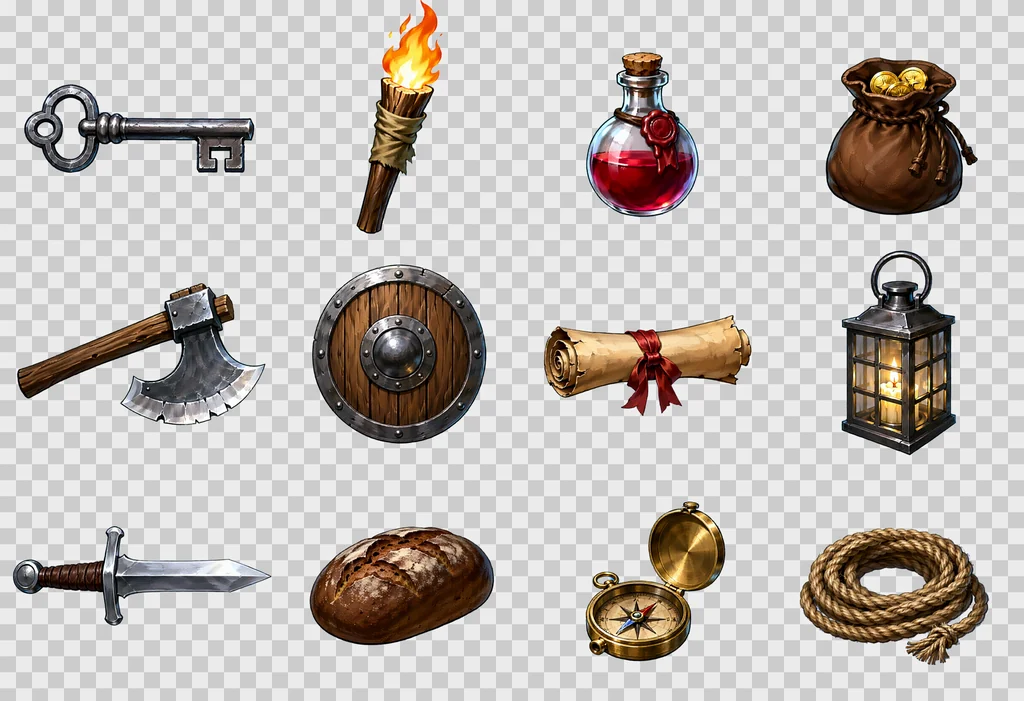
prompt เต็มของ sheet นี้:
This is an RGBA image with transparency. A game item sheet of twelve different dungeon objects, each drawn large in its own cell of a strict 4 by 3 grid of equal cells with generous empty space between the cells, read left to right then top to bottom. Cell 1, row 1 column 1: an iron key with a looped bow and two square teeth, lying horizontally across the cell, pointing to the right. Cell 2, row 1 column 2: a wooden torch, a split oak stick wrapped in tarred cloth, the flame burning upward. Cell 3, row 1 column 3: a small red health potion, a round glass flask with a cork stopper and a wax seal. Cell 4, row 1 column 4: a leather coin pouch, drawstring closed, bulging, two gold coins showing at the mouth. Cell 5, row 2 column 1: a battle axe, a long straight ash-wood haft and one broad crescent steel blade with a bearded lower edge, the head wedged and riveted, the edge bright and nicked, lying horizontally across the cell, pointing to the right. Cell 6, row 2 column 2: a round wooden shield with an iron rim and a central iron boss, three planks visible, seen straight on. Cell 7, row 2 column 3: a rolled parchment scroll tied with a red ribbon, lying horizontally across the cell, pointing to the right. Cell 8, row 2 column 4: a lantern, a square iron frame with four glass panes and a ring handle, a candle glowing inside. Cell 9, row 3 column 1: a short sword with a plain crossguard, a leather-wrapped grip and a round pommel, lying horizontally across the cell, pointing to the right. Cell 10, row 3 column 2: a loaf of dark rye bread with a cracked crust. Cell 11, row 3 column 3: a brass compass in an open round case, the needle visible. Cell 12, row 3 column 4: a coil of hemp rope with a frayed end. Exactly one object per cell, twelve objects in all, no duplicates, no object crossing into another cell, each object drawn large enough to fill most of its cell. Style: hand-painted game illustration, visible brush strokes, rich material detail, crisp silhouettes, soft frontal light from slightly above, a thin cool rim light, no outline, no motion blur. The image has alpha channel and the background is transparent, no ground, no cast shadows, no frames, no text, no labels.
prop และเอฟเฟกต์: 4 คูณ 2 หรือ 4 คูณ 3
prop: "dungeon fixtures seen straight on from the front" พร้อมแสงสม่ำเสมอ เอฟเฟกต์: "glowing, with soft luminous edges" กระสุนหรือสิ่งที่ยิงออกไป: "flying to the right"
ไอเทมเดียวหลายมุมมอง: แถวเดียว 4 ช่อง
วัตถุเดียวกันทั้งสี่ช่อง: มุมพื้นฐานจากด้านหน้า วางบนพื้นมองจากด้านบน ไอคอนช่องเก็บของแบบสี ไอคอนแอ็กชันสองสี ท่าถูกขว้างเพิ่มเป็นแถวที่สองได้ ชุดแรก ดาบ falchion กับขวาน ให้ foreshortening ที่น่าเชื่อ รวมถึงขวานที่มองตรงจากด้านคม แต่อาวุธที่ถูกขว้างซึ่งหันตรงเข้าหากล้องคือช่องที่พังบ่อยที่สุด เทมเพลตนี้ใหม่ที่สุดในชุดและยังอยู่ระหว่างทบทวน
สูตรเดียวกันในสไตล์อื่น
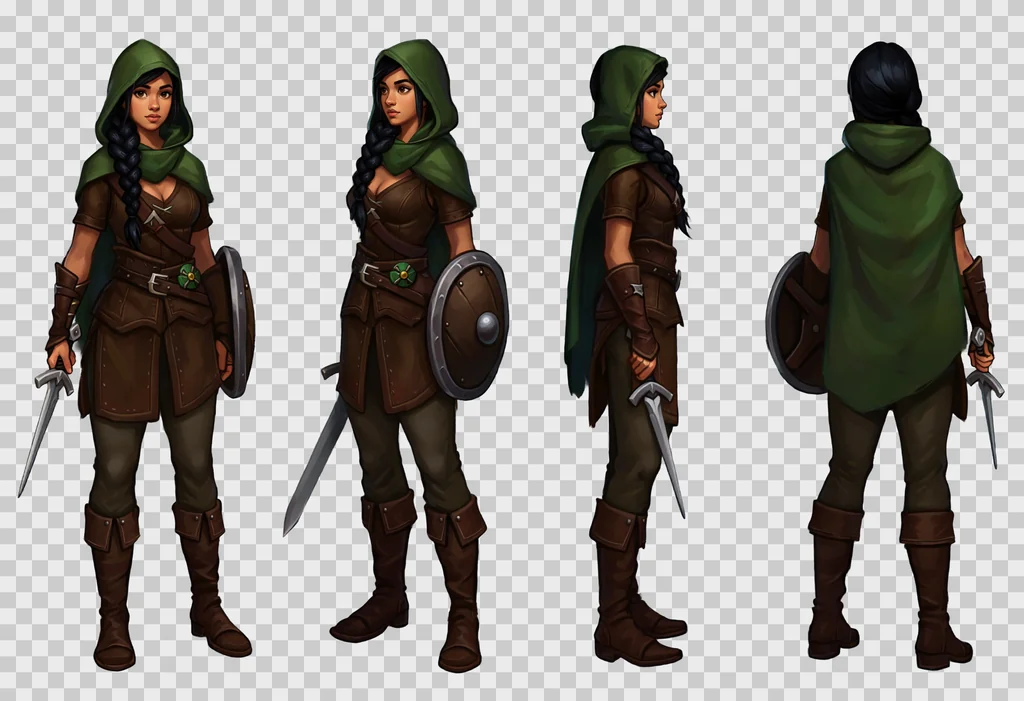
กริด ข้อความของแต่ละช่อง และกรอบ RGBA ไม่ขึ้นกับสไตล์ มีเพียงบล็อกสไตล์ที่เปลี่ยน sheet ด้านล่างมาจาก prompt เรนเจอร์ โดยสลับบล็อกสไตล์เป็นหนึ่งในชุดนี้:
- Pixel art
Style: 16-bit pixel art, a visible pixel grid, flat colours with two or three shades per material, hard pixel edges, a one-pixel dark outline, no anti-aliasing, no gradients. - อนิเมะ
Style: anime cel shading, clean dark line art, flat colours with one hard shadow tone, small bright highlights, a saturated palette, soft frontal light. - Flat vector
Style: flat vector illustration, simple geometric shapes, no gradients, no texture, a limited palette of six colours, thick uniform outlines, soft frontal light. - Low poly
Style: low poly 3D render look, visible flat triangular facets, matte materials, no texture detail, soft studio light from the front and above.
สำหรับบล็อก low poly ให้ลบ "3d render" ออกจาก negative prompt ไม่อย่างนั้นคำสั่งสองอย่างจะขัดกัน
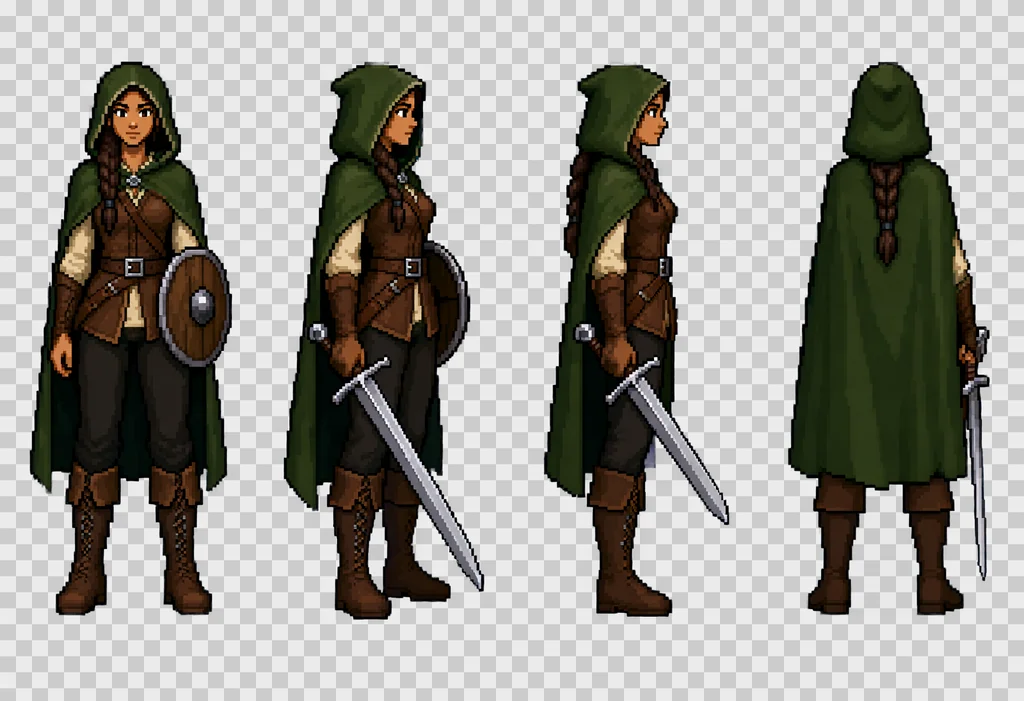
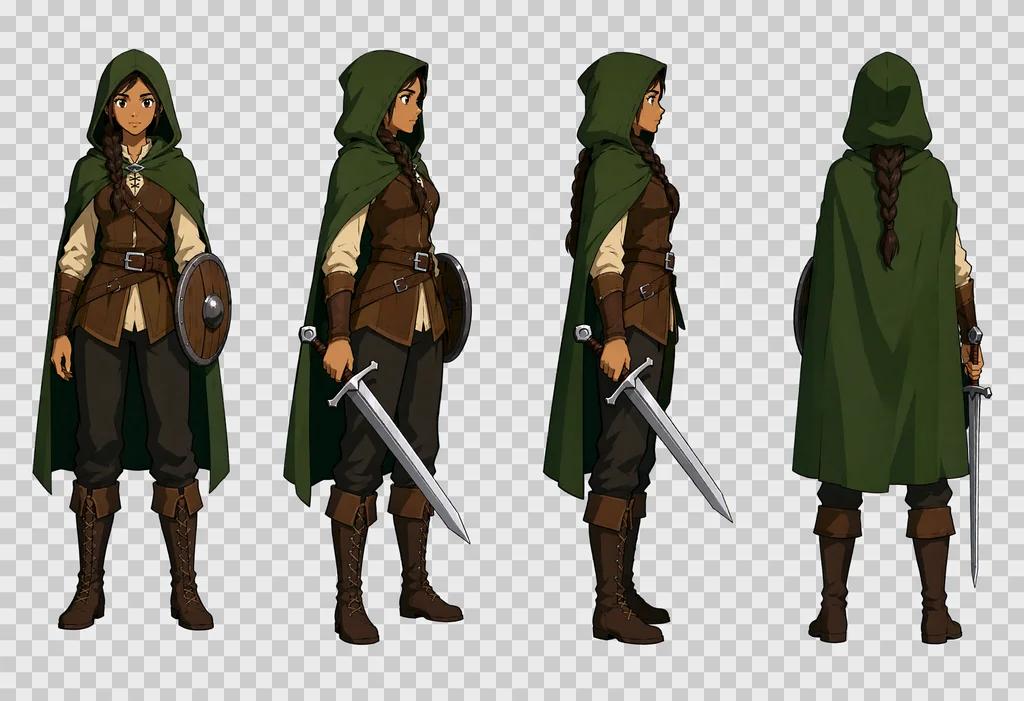
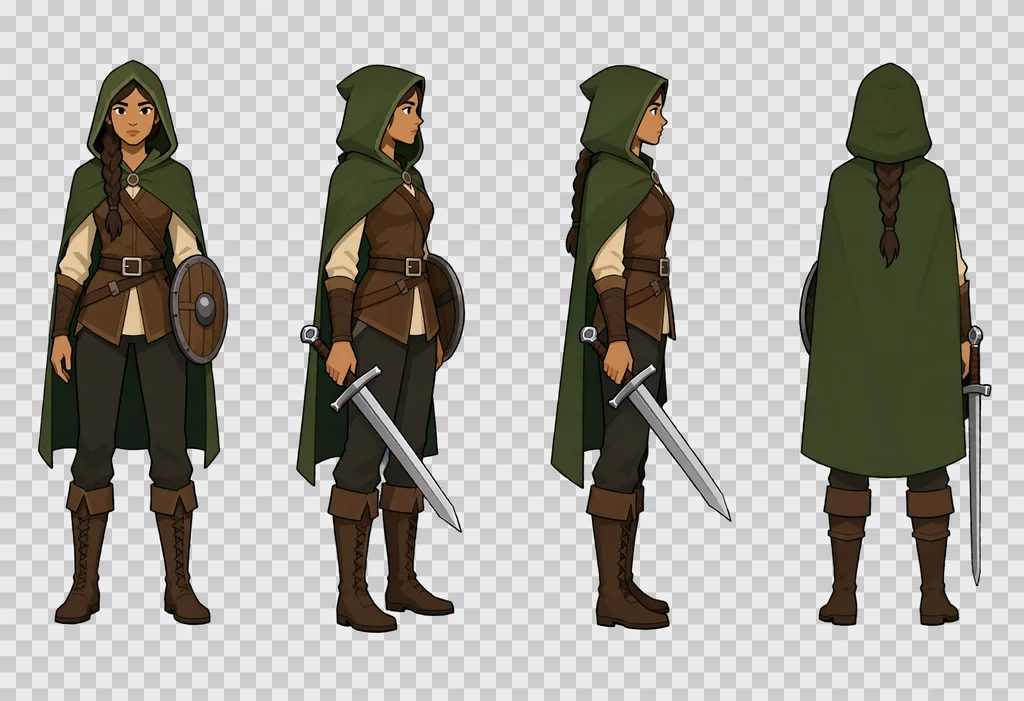
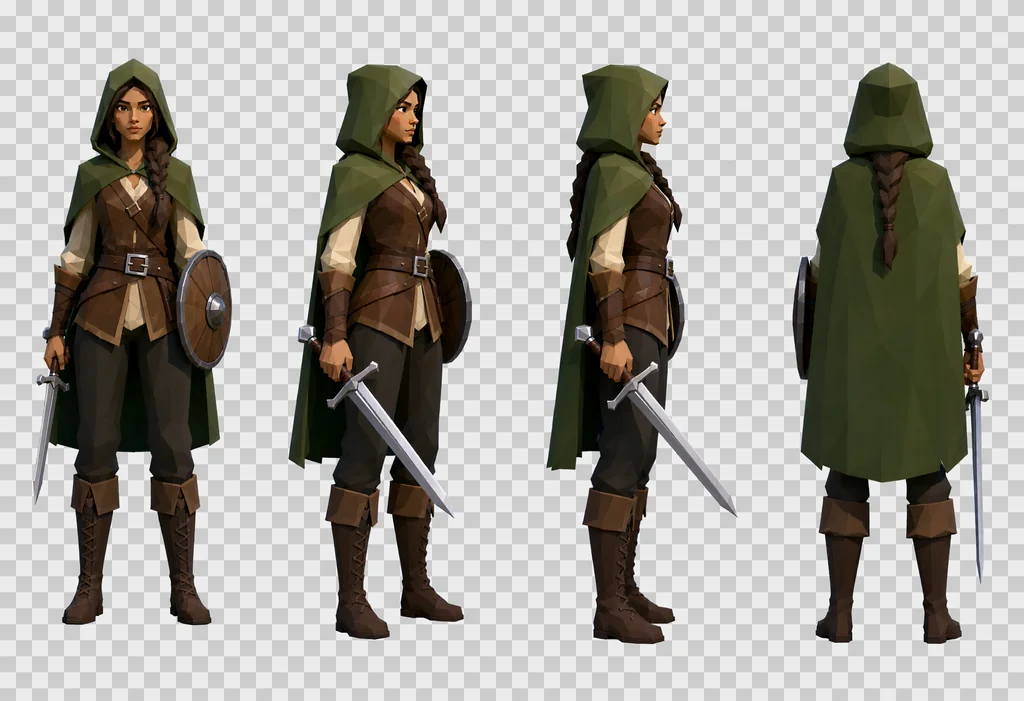
ใน sheet ทั้งสี่ด้านบน ตัวละคร เครื่องแต่งกาย และท่าทางคงเดิมจากบล็อกหนึ่งไปอีกบล็อก มีเพียงการเรนเดอร์ที่เปลี่ยน เลือกบล็อกเดียวสำหรับทั้งชุด sprite ที่ทำจากคนละบล็อกวางด้วยกันไม่เข้า
ตัด sheet เป็น sprite
การตัดทำบน alpha channel สี่ขั้นตอน
- แบ่งภาพเป็นช่องเท่า ๆ กัน
- ในแต่ละช่อง หา bounding box ของพิกเซลที่ alpha สูงกว่า 32 เผื่อขอบ 4 พิกเซล
- ตั้ง alpha ที่ต่ำกว่า 24 ให้เป็นศูนย์ เพื่อลบ halo
- ถือว่าช่องที่มีพิกเซลทึบน้อยกว่า 100 พิกเซลเป็นช่องว่าง
จากนั้นจัดวาง sprite แต่ละตัวตามการใช้งาน
- sprite ตัวแบบ: บน canvas ที่มีสัดส่วนเท่าภาพอ้างอิงของเกม เท้าชิดขอบล่าง
- วัตถุ: จัดกึ่งกลาง canvas
- ไอคอนช่องเก็บของ: จัตุรัส 192 พิกเซล วัตถุที่ยาวกว่า 1.6 เท่าของความกว้างจะถูกหมุน 45 องศา ปลายชี้ไปมุมบนขวา
- ประตู ลูกกรง: ยืดให้ชนขอบทุกด้าน บังคับ alpha เป็น 255 ประตูออกมามืดกว่าที่ต้องการสองถึงสี่เท่า จึงต้องปรับความสว่างให้ตรงกับภาพอ้างอิง
ถ้าตัวแบบล้นเข้าช่องถัดไป การตัดจะตัดมันขาด นี่คือเหตุผลที่ prompt ขอ "generous empty space between the cells"
texture แบบ seamless
โมเดลไม่ได้ให้ tile ที่สมบูรณ์แม้จะขอ วิธีด้านล่างซึ่งคงไว้หลังล้มเหลวหลายครั้ง จึงซ่อมรอยต่อภายหลัง
- text to image ที่ 1024 × 1024 ด้วย "A seamless tileable texture, top-down flat orthographic close-up of … Even diffuse lighting, no vignette, no perspective."
- เลื่อนภาพไปครึ่งความกว้างและครึ่งความสูง รอยต่อจะมาอยู่ตรงกลางเป็นรูปกากบาท
- image to image ที่ strength 0.55 บนภาพที่เลื่อนแล้ว ด้วยโหนด
QwenImageImg2Img - เก็บเฉพาะกากบาทตรงกลางที่เกลี่ยขอบแล้ว จากรอบนั้น กว้าง 96 พิกเซลจากรอยต่อแต่ละด้าน ด้วย Gaussian blur 32 พิกเซล แล้ววางกลับบนภาพต้นฉบับที่เลื่อนไว้ ขอบภาพยังเป็นส่วนในของการเรนเดอร์แรกที่ไม่ถูกแตะ
- เลื่อนกลับ ทางเดิม
- mirror blend 24 พิกเซล ที่ขอบแต่ละด้าน เพื่อลบรอยสะดุดของสีที่ยังเหลืออยู่ และรอยสะดุดของความนูนที่ตามมา
- สร้าง normal map และ roughness จากภาพสุดท้าย
ค่าควบคุม: ผลต่างเฉลี่ยระหว่างขอบตรงข้ามหารด้วย gradient เฉลี่ยภายใน tile ที่ 1.0 รอยต่อไม่ต่างจากพิกเซลข้างเคียงใด ๆ
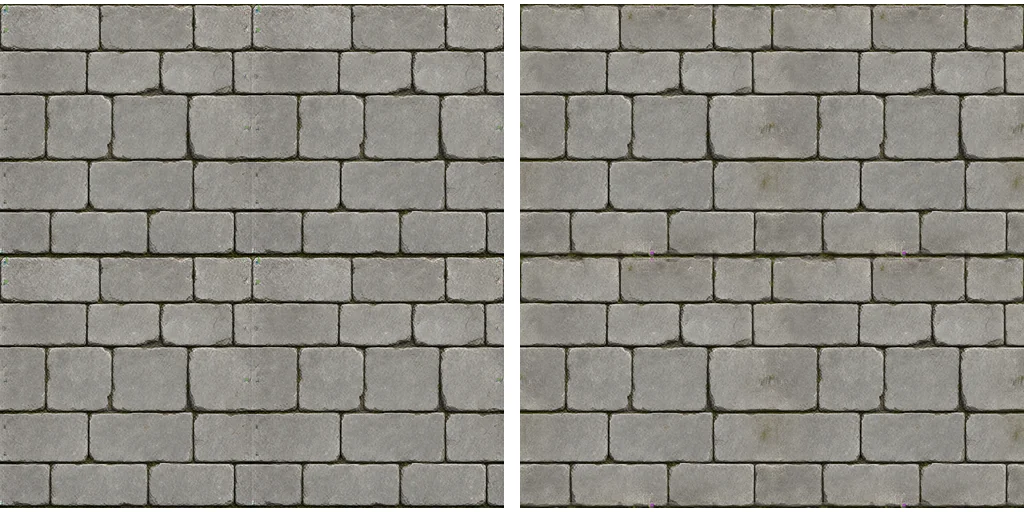
สิ่งที่ไม่ได้ผล:
- รอบ image-to-image เต็มภาพโดยไม่มี mask: โมเดลสร้างรอยต่อขึ้นใหม่ที่ขอบของตัวเอง
- สองรอบสลับกัน: ผลแย่ลง 2.07 แล้ว 2.43 บน texture พื้น
- วาดทับ texture ความละเอียดต่ำที่มีอยู่ด้วย image to image: ได้ผลเป็นริ้ว ให้เริ่มใหม่จาก text to image
ขอลวดลายขนาดใหญ่ ห้าหรือหกแถวของก้อนหินต่อ tile ลวดลายเล็กทำให้การซ้ำเห็นชัด
ทำใหม่ ตรวจ วนรอบ
- sheet เป็น deterministic สำหรับ prompt และ seed ที่กำหนด เก็บ PNG ดิบและข้อความ prompt ไว้คู่กัน
- ทำตัวแบบใหม่ ด้วยการทำ sheet ทั้งแผ่นใหม่ด้วย seed อื่น ไม่ใช่ทีละช่อง เก็บ sheet เก่าไว้: ท่าที่ดีกว่าอาจหยิบจากมันได้ภายหลัง
- แยกการวาดออกจากการตัด การตัดและการจัดวางรันซ้ำจาก sheet ดิบได้โดยไม่ต้องเรียก ComfyUI
- ทำให้ batch กลับมารันต่อได้ sheet ที่อยู่บนดิสก์แล้วจะไม่ถูกวาดซ้ำ งานสามชั่วโมงจึงรอดจากการถูกขัดจังหวะ
มีสามอย่างที่ควรตรวจก่อนนำ sprite เข้าเกม
- ตรวจบนพื้นหลังสว่างหรือลายหมากรุก ไม่ใช่เทาเข้ม พื้นหลังมืดซ่อนขอบเหลื่อมและ halo
- ดูที่ขนาดจริงในเกม ไม่ใช่แค่ขยายดู ไอคอนต้องยังอ่านออกที่ 32 พิกเซล
- แคปหน้าจอในเกม เพื่อเทียบ sprite กับพื้นผิว sprite แบบ HD บนกำแพงที่เป็นพิกเซลก้อนใหญ่จะขัดกัน พื้นผิวจึงต้องทำใหม่ให้อยู่ระดับเดียวกัน
ข้อจำกัดที่พบ
- วัตถุบางครั้งออกมาเหมือนภาพถ่ายเกินไป โดยเฉพาะโลหะและแก้ว แก้เป็นกรณีไปในข้อความ
- ช่องท่าโจมตี เป็นส่วนที่เชื่อถือได้น้อยที่สุด ตรวจทีละตัวแบบ
- เฉดสีเพี้ยน จาก sheet หนึ่งไปอีก sheet: กำแพงกลายเป็นสีน้ำเงิน ประตูออกมามืด กำหนดสีในข้อความ และแก้ภายหลังหากจำเป็น
- โมเดลอาจรวมหรือทำช่องซ้ำ บนกริดที่แน่นเกินไป อยู่ที่ไม่เกินสิบสองช่อง และระบุแต่ละช่องด้วยแถวและคอลัมน์
- ตัวอักษรและสัญลักษณ์บนวัตถุ เช่นรูนหรือจารึก ไม่น่าเชื่อถือ ตัดออกหรือเติมภายหลัง
- ใบอนุญาต weights อยู่ภายใต้ Qwen Research License: วิจัยและประเมินผลเท่านั้น asset ที่ปล่อยในเกมเชิงพาณิชย์ต้องขอใบอนุญาตจาก Qwen ก่อน และบริการโฮสต์ก็มีเงื่อนไขของตัวเอง
การตั้งค่าของชุดนี้ในตารางเดียว:
| การตั้งค่า | ค่า |
|---|---|
| โมเดล | Qwen-Image 2.1 ฐาน, int8 |
| Step, CFG | 20, 3.0 พร้อม negative prompt |
| Sampler | euler, simple |
| Guidance | APG 1.0, 10.0, 0.3 ตามด้วย FreSca 1.0, 2.0, 8 |
| Sheet | 2432 × 1664, แถวเดียว 4 ช่อง หรือกริด 4 คูณ 3 |
| Texture | 1024 × 1024, seed คงที่ |
| รอบซ่อมรอยต่อ | image to image ที่ 0.55, แถบกว้าง 96 พิกเซล |
| blend ที่ขอบ | 24 พิกเซล |