One sheet, not one image per asset
Instead of asking the model for one image per sprite, ask for one sheet: a single 4-megapixel image laid out as a grid, whose cells you then cut apart with a script.
- A subject, a character for instance, is one sheet of four views of the same figure.
- A family of objects is one sheet of eight to twelve different objects.
- An important item, such as a weapon, is one sheet of several views of that item.
A sheet brings three things.
- Consistency. The four views come out of the same render: same colours, same costume, same weapon, same light. Four separate renders give four different characters.
- One style shared by all the objects of a family.
- Throughput. A sheet takes four to five minutes and yields four to twelve sprites.
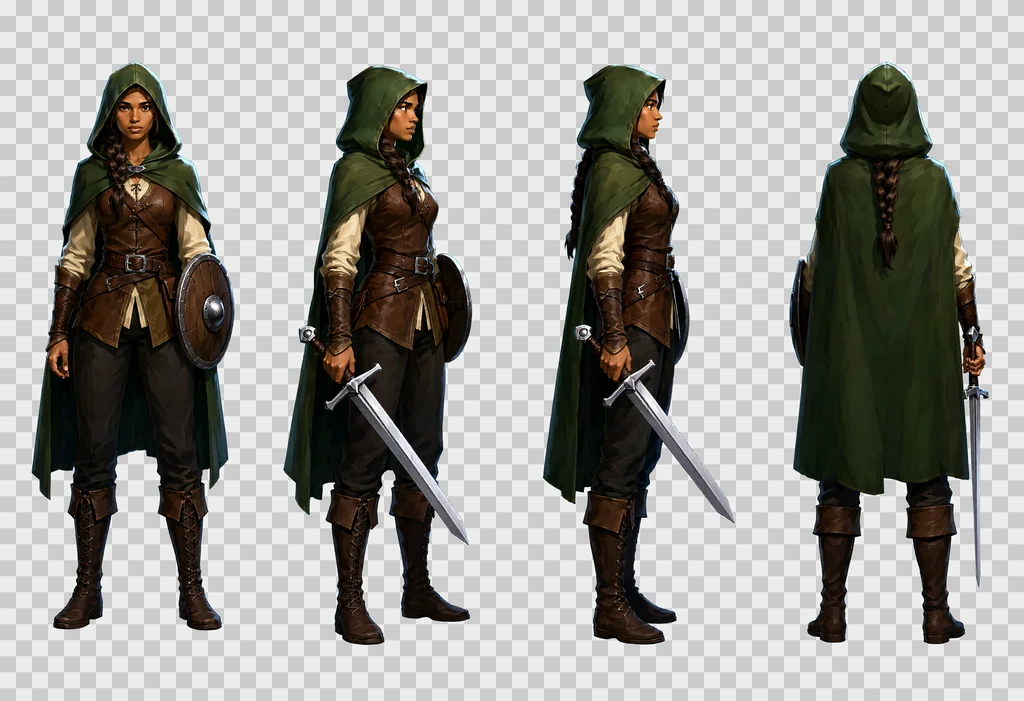
The sheets are not only for games. A turnaround of a character works as a reference image for an app mock-up, a comic or a storyboard. It is also the kind of reference image that image-to-video models such as Seedance, MiniMax Hailuo or Wan 2.2 accept as a starting point.
Everything below was checked while producing a set of 1000+ files: characters, items, effects, props and textures for one game. The settings follow the Qwen-Image 2.1 settings guide.
Settings and the ComfyUI graph
Use the base model rather than the Turbo, at CFG 3 with a negative prompt, with APG and FreSca on the model path. There is no prompt upsampler in the graph: the prompt goes in as written.
| Node | Setting |
|---|---|
| UNETLoader | qwen_image_2.1_int8_convrot.safetensors |
| CLIPLoader | qwen3vl_8b_int8_convrot.safetensors, type qwen_image |
| VAELoader | qwen_image_2.1_vae_bf16.safetensors |
| QwenImage21Cache | device auto, dtype int8 |
| APG | eta 1.0, norm threshold 10.0, momentum 0.3 |
| FreSca | scale low 1.0, scale high 2.0, frequency cutoff 8 |
| TextEncodeQwenImage21 | prompt and negative prompt, resolution 1024 |
| EmptyLatentImage | 2432 × 1664 for a sheet, 1024 × 1024 for a texture |
| KSampler | 20 steps, CFG 3.0, euler, simple, denoise 1.0 |
| VAEDecode, SaveImage | the PNG comes out in RGBA, see the next section |
The model path runs UNETLoader, then QwenImage21Cache, APG, FreSca and the KSampler. Times measured on the machine that produced the set:
| Job | Time |
|---|---|
| Sheet, 2432 × 1664, 20 steps | 230 to 320 s |
| Texture, 1024 × 1024, text to image | about 80 s |
| Image-to-image pass, 1024 × 1024 | about 40 s |
The settings guide records a 12 GB card rendering a 4-megapixel image of this size with a peak of 11.5 GB on the int8 weights, so a sheet should fit, with nothing else sharing the card.
Two traps if you drive ComfyUI through its API. In the JSON sent to /prompt, a reference image is passed as a flat key: "images.image_1": [node, 0]. The nested form, "images": {"image_1": …}, is accepted without an error, and the reference is silently ignored. And always check that the PNG you receive is in RGBA mode. A badly framed prompt gives an opaque background; raise an error rather than cut it.
Native transparency
Qwen-Image 2.1 produces an alpha channel on its own, provided the prompt is framed by two sentences.
- Start:
This is an RGBA image with transparency. - End:
The image has alpha channel and the background is transparent.
The result is a real RGBA PNG. About 1 % of the pixels are semi-transparent and there is no colour fringe. This replaces the old magenta background to key out, which left rims and forced a clean-up of colour spill.
Add to the closing sentence: no ground, no cast shadows, no frames, no text, no labels. Without it the model likes to put a shadow or a patch of ground under each subject, and that breaks the cutting.
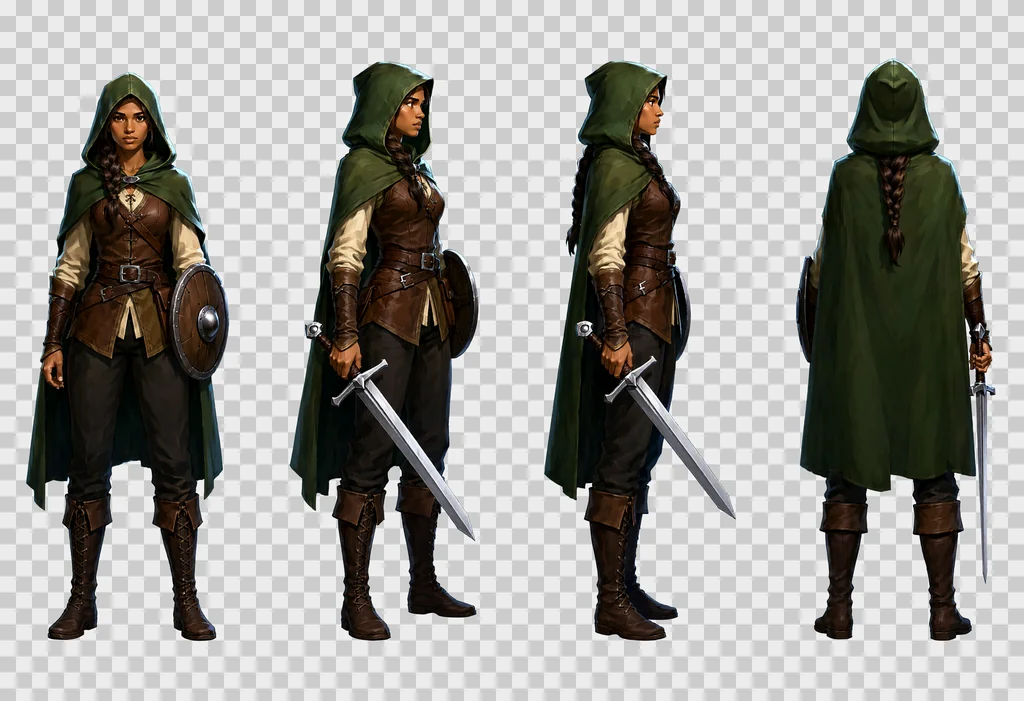
How to write a sheet prompt
Since nothing rewrites the prompt for you, it has to be long and precise: the prompts of the set run from 2,500 to 3,000 characters, and a short one gives a poor sheet whose views look alike.
The order below is the one that worked. Keep it.
- The opening RGBA sentence.
- The subject and the grid. "A game character turnaround sheet of one single character, description, drawn four times at exactly the same scale in a strict row of 4 equal cells with generous empty space between the cells, read left to right."
- The cells, one by one, numbered. "cell 1, … ; cell 2, … ; cell 3, … ; cell 4, …" On a 4 by 2 grid, name the rows too: "Top row: cell 1, … Bottom row: cell 5, …"
- The identity clause. "Same character in every cell: identical colours, proportions, costume, weapon and lighting."
- The style block, the same for the whole set.
- The closing RGBA sentence.
The full prompt of the ranger sheet above:
This is an RGBA image with transparency. A game character turnaround sheet of one single character, a young woman ranger in her twenties with light brown skin, a long dark braid over one shoulder, a hooded forest-green cloak, a brown leather jerkin over a cream linen shirt, dark trousers, tall laced boots, a straight one-handed sword with a plain steel crossguard and a leather-wrapped grip held low in her right hand with the point toward the ground, and a small round wooden buckler strapped to her left forearm, drawn four times at exactly the same scale in a strict row of 4 equal cells with generous empty space between the cells, read left to right: cell 1, standing at rest, seen straight from the front, both feet on the same line, face fully visible; cell 2, standing at rest, turned 45 degrees to her right so we see the front and her right side, the sword arm nearest the viewer; cell 3, standing at rest in strict profile, facing right, one eye visible, the braid down her back, the sword in front of her; cell 4, standing at rest seen directly from behind, the back of the hood, the cloak and the braid, the sword hanging point down along her right leg so that exactly one blade shows beside the cloak, no face. Same character in every cell: identical colours, proportions, costume, weapon and lighting. Style: hand-painted game illustration, visible brush strokes, rich material detail, crisp silhouettes, soft frontal light from slightly above, a thin cool rim light, no outline, no motion blur. The image has alpha channel and the background is transparent, no ground, no cast shadows, no frames, no text, no labels.
Rules learned from the trials:
- Describe the material, not only the object. "a battle axe: a long straight ash-wood haft and one broad crescent steel blade with a bearded lower edge, the head wedged and riveted, the edge bright and nicked".
- Describe each view by what the camera sees, not by its name. "seen from a three-quarter back angle, turned 135 degrees so we see its back and its left side, the face hidden" works. "back three-quarter view" alone works much less often.
- A top view, if you add one, needs insistence: camera pointing straight down, only the top of the head and the shoulders visible, no face, "like a token on a tactical board game map".
- Say what must not be there when the model drifts. A subject with no limbs grows claws and a mouth in the attack cells if the text is generic. Write "no arms, no legs, no teeth".
- Write the action cells, if you add them, for each subject. One shared text, "the subject attacks", gives weak poses across a whole cast. Each subject gets its own wind-up and its own strike: a raised club, a bite, a breath of fire, a tentacle.
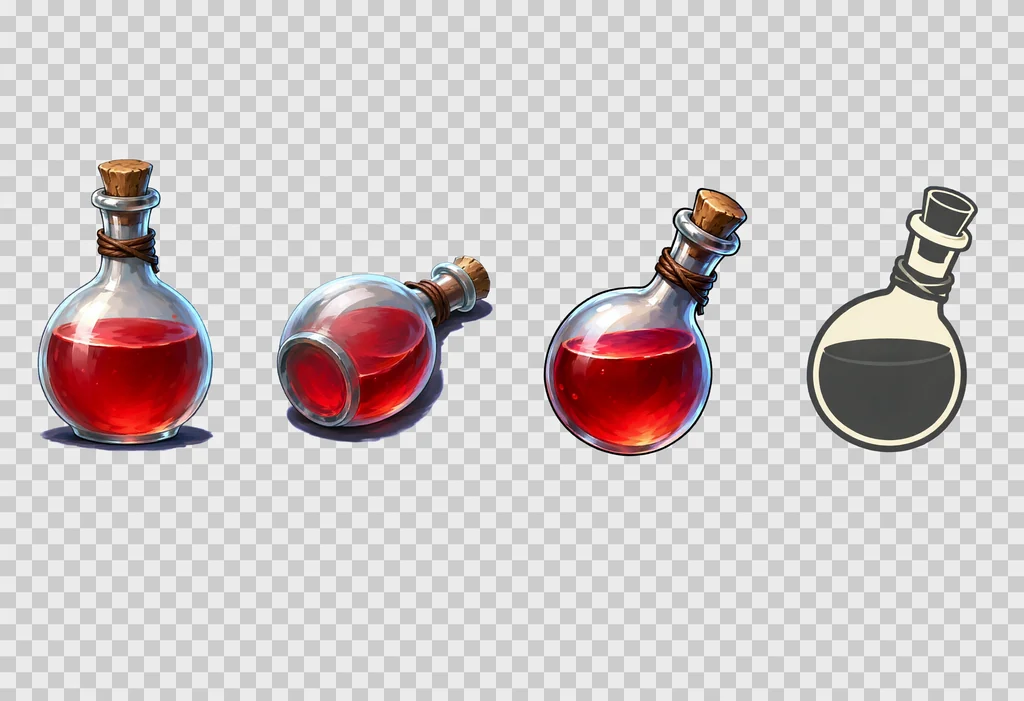
- Watch the words that change the rendering. "bold simplified, strong contrast, clean silhouette" for an inventory icon produced a black and white pictogram. For a colour icon, write "in full colour, painted with exactly the same rich materials as cell 1".
- One style block for the whole set keeps subjects, objects and props in the same world. The block of this set is in the prompt above: hand-painted game illustration, visible brush strokes, material detail, crisp silhouettes, soft frontal light from slightly above, a cool rim light, no outline, no motion blur.
The negative prompt of the set:
artifacts, washed-out colors, low quality, low resolution, blurry, extra fingers, missing fingers, deformed hands, bad anatomy, extra limbs, text, watermark, signature, labels, captions, letters, numbers, cast shadow, ground, floor, gradient background, frame, border lines, photo, 3d render
Sheet templates
All the sheets are 2432 × 1664 pixels.
Single subject: a row of 4, one character
| Cell | View |
|---|---|
| 1 | at rest, front |
| 2 | at rest, three-quarter front |
| 3 | at rest, strict profile |
| 4 | at rest, back |
Four views in a row is the layout that held on every test: tall cells, a large figure, and the weapon drawn right in each view. A 4 by 2 grid with a top view and two action cells works too, but those four extra cells are where the sheets go wrong: a second blade in the back view, a misplaced sword from above, an odd hand in the strike. Add them when you need them, and check them one by one.
Object family: 4 by 3 or 4 by 2, different objects
One line per cell: "Cell 5, row 2 column 1: description." Long objects get "lying horizontally across the cell, pointing to the right" so they fill their cell. End with: "Exactly one object per cell, N objects in all, no duplicates, no object crossing into another cell, each object drawn large enough to fill most of its cell."
Twelve objects per sheet is the largest number used in the set. Beyond that the cells get small.
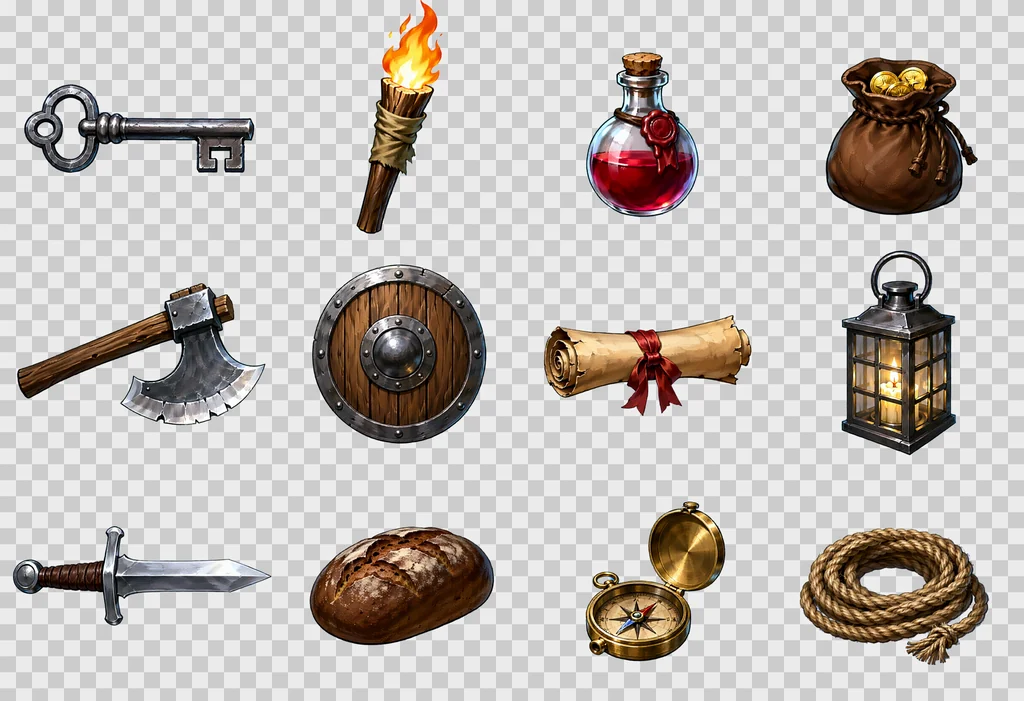
The full prompt of this sheet:
This is an RGBA image with transparency. A game item sheet of twelve different dungeon objects, each drawn large in its own cell of a strict 4 by 3 grid of equal cells with generous empty space between the cells, read left to right then top to bottom. Cell 1, row 1 column 1: an iron key with a looped bow and two square teeth, lying horizontally across the cell, pointing to the right. Cell 2, row 1 column 2: a wooden torch, a split oak stick wrapped in tarred cloth, the flame burning upward. Cell 3, row 1 column 3: a small red health potion, a round glass flask with a cork stopper and a wax seal. Cell 4, row 1 column 4: a leather coin pouch, drawstring closed, bulging, two gold coins showing at the mouth. Cell 5, row 2 column 1: a battle axe, a long straight ash-wood haft and one broad crescent steel blade with a bearded lower edge, the head wedged and riveted, the edge bright and nicked, lying horizontally across the cell, pointing to the right. Cell 6, row 2 column 2: a round wooden shield with an iron rim and a central iron boss, three planks visible, seen straight on. Cell 7, row 2 column 3: a rolled parchment scroll tied with a red ribbon, lying horizontally across the cell, pointing to the right. Cell 8, row 2 column 4: a lantern, a square iron frame with four glass panes and a ring handle, a candle glowing inside. Cell 9, row 3 column 1: a short sword with a plain crossguard, a leather-wrapped grip and a round pommel, lying horizontally across the cell, pointing to the right. Cell 10, row 3 column 2: a loaf of dark rye bread with a cracked crust. Cell 11, row 3 column 3: a brass compass in an open round case, the needle visible. Cell 12, row 3 column 4: a coil of hemp rope with a frayed end. Exactly one object per cell, twelve objects in all, no duplicates, no object crossing into another cell, each object drawn large enough to fill most of its cell. Style: hand-painted game illustration, visible brush strokes, rich material detail, crisp silhouettes, soft frontal light from slightly above, a thin cool rim light, no outline, no motion blur. The image has alpha channel and the background is transparent, no ground, no cast shadows, no frames, no text, no labels.
Props and effects: 4 by 3 or 4 by 2
Props: "dungeon fixtures seen straight on from the front", with even light. Effects: "glowing, with soft luminous edges". Projectiles: "flying to the right".
One item in several views: a row of 4
The same object in all four cells: the base view from the front, lying on the ground seen from above, a colour inventory icon, a two-tone action icon. Thrown views can be added in a second row; a first series of a falchion and an axe gave convincing foreshortening, including the axe seen edge-on, but a thrown weapon seen head-on is the cell that fails most often. This template is the newest of the set and still under review.
The same recipe in other styles
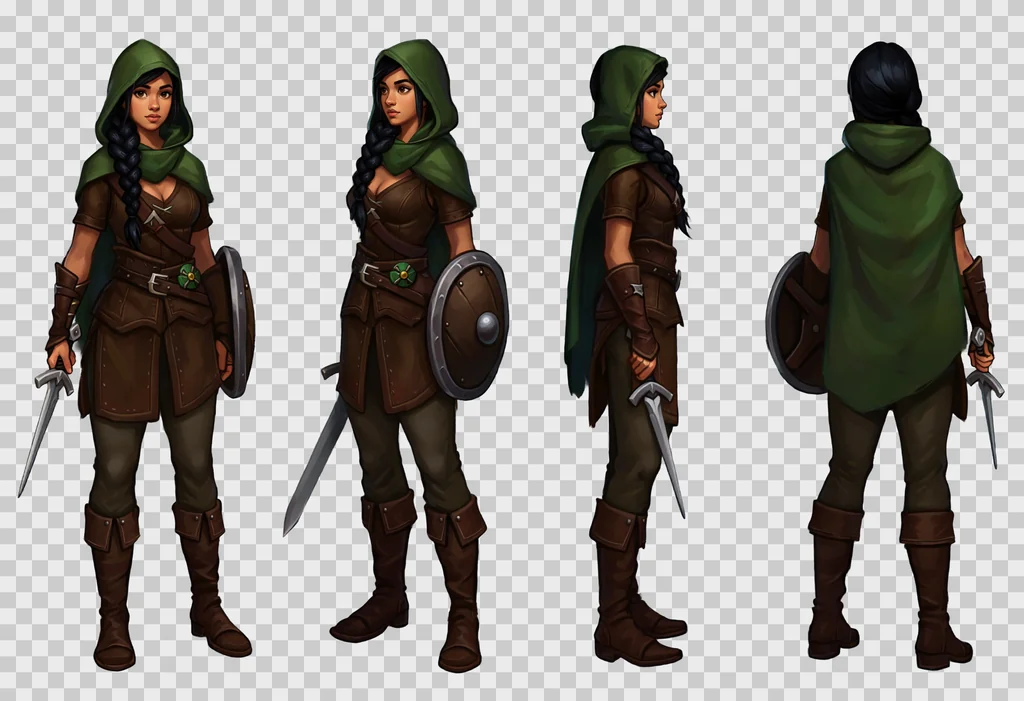
The grid, the cell texts and the RGBA frame do not depend on the style. Only the style block changes. The sheets below come from the ranger prompt with the style block swapped for one of these:
- Pixel art.
Style: 16-bit pixel art, a visible pixel grid, flat colours with two or three shades per material, hard pixel edges, a one-pixel dark outline, no anti-aliasing, no gradients. - Anime.
Style: anime cel shading, clean dark line art, flat colours with one hard shadow tone, small bright highlights, a saturated palette, soft frontal light. - Flat vector.
Style: flat vector illustration, simple geometric shapes, no gradients, no texture, a limited palette of six colours, thick uniform outlines, soft frontal light. - Low poly.
Style: low poly 3D render look, visible flat triangular facets, matte materials, no texture detail, soft studio light from the front and above.
For the low poly block, remove "3d render" from the negative prompt, or the two instructions fight.
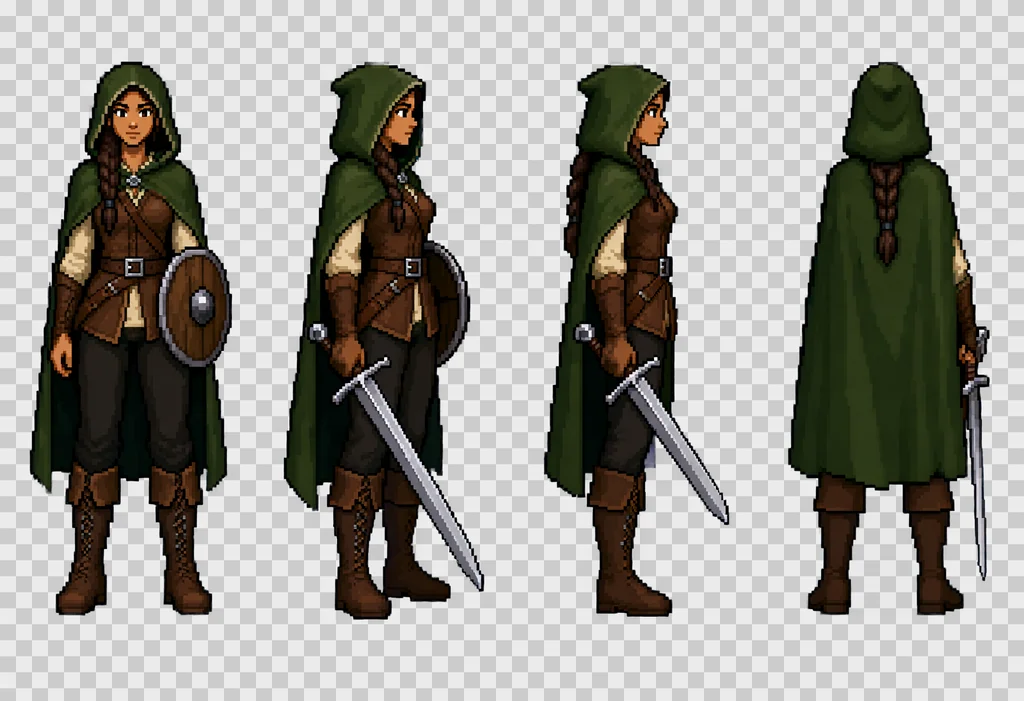
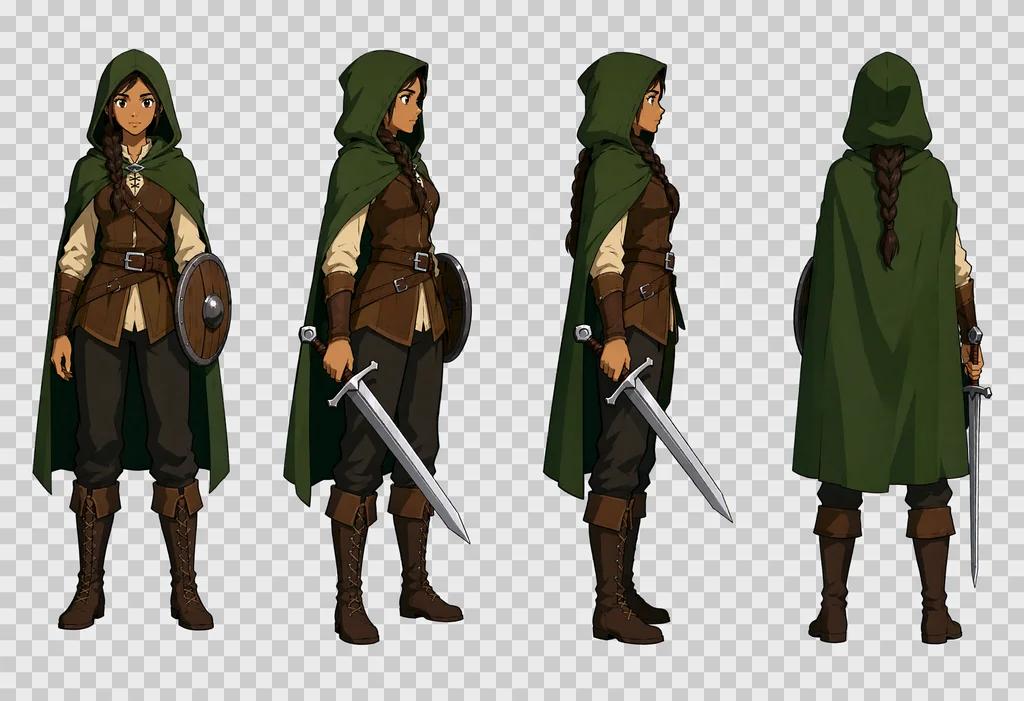
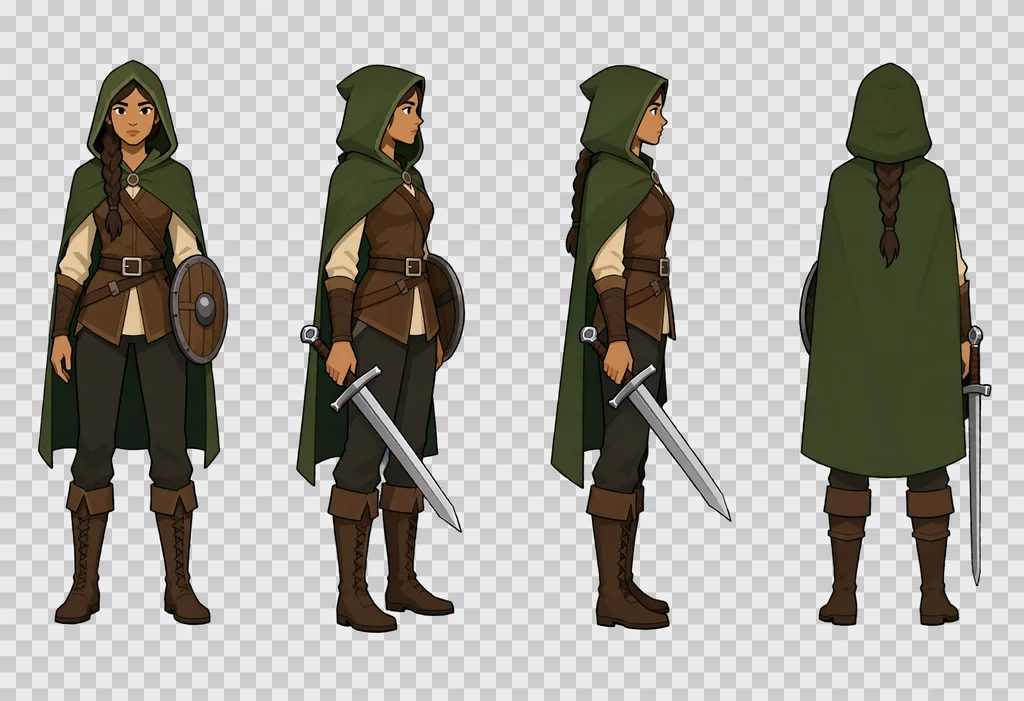
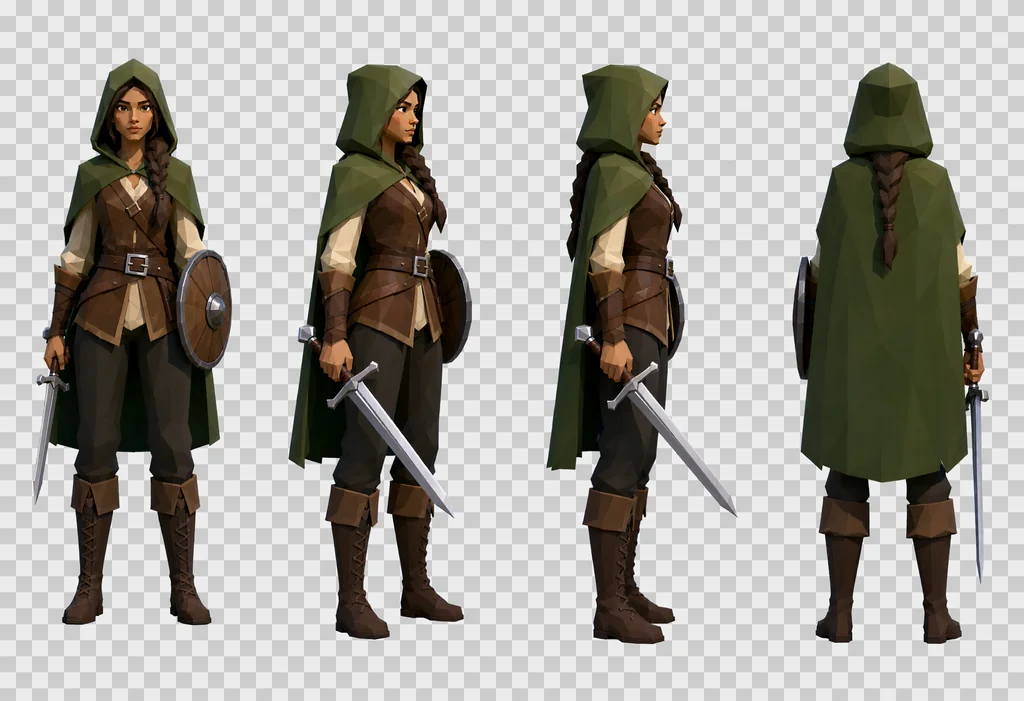
In the four sheets above the character, her costume and her poses held from one block to the next; only the rendering changed. Pick one block for a whole set. Sprites made with different blocks do not sit together.
Cutting the sheet into sprites
The cut is done on the alpha channel, in four steps.
- Divide the image into equal cells.
- In each cell, take the bounding box of the pixels whose alpha is above 32, with a 4-pixel margin.
- Set alpha below 24 to zero, which removes the halo.
- Treat a cell with fewer than 100 opaque pixels as empty.
Then place each sprite according to its use.
- Subject sprite: in a canvas with the aspect ratio of the game's reference image, feet on the bottom edge.
- Object: centred in the canvas.
- Inventory icon: a 192-pixel square. An object longer than 1.6 times its width is rotated 45 degrees, tip to the top right.
- Door, grate: stretched edge to edge, alpha forced to 255. Doors come out two to four times darker than wanted, so match their brightness to a reference.
If a subject spills into the next cell, the cut truncates it. That is why the prompt asks for "generous empty space between the cells".
Seamless textures
The model does not produce a perfect tile even when asked, so the method below, kept after several failures, repairs the seam afterwards.
- Text to image at 1024 × 1024 with "A seamless tileable texture, top-down flat orthographic close-up of … Even diffuse lighting, no vignette, no perspective."
- Shift the image by half its width and half its height. The seam now runs through the middle, as a cross.
- Image to image at strength 0.55 on the shifted image, with the
QwenImageImg2Imgnode. - Keep only a softened central cross of that pass, 96 pixels on each side of the seam with a 32-pixel Gaussian blur, pasted back on the shifted original. The edges stay the untouched interior of the first render.
- Shift back the other way.
- Mirror blend 24 pixels on each side of the edge to cancel the last jump in colour, and so in relief.
- Derive the normal map and the roughness from the final image.
Control measure: the mean difference between opposite edges divided by the mean gradient inside the tile. At 1.0 the seam is no different from any neighbouring pixel.
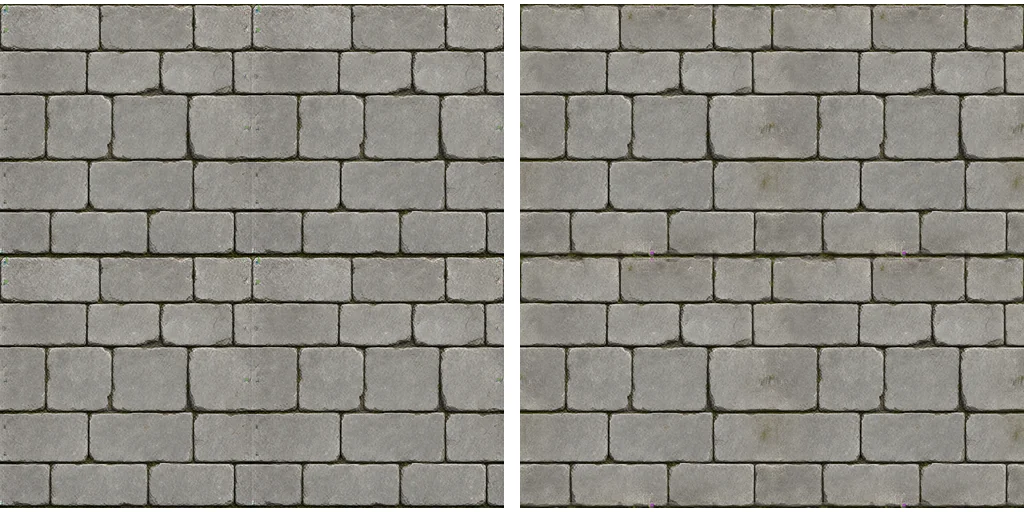
What did not work:
- A full image-to-image pass with no mask: the model recreates a seam on its own edges.
- Two alternating passes: the result gets worse, 2.07 then 2.43 on the floor texture.
- Repainting an existing low-resolution texture in image to image: a striped result. Start again from text to image.
Ask for large patterns, five or six courses of blocks per tile. Small patterns make the repetition obvious.
Redo, check, iterate
- A sheet is deterministic for a given prompt and seed. Keep the raw PNG and the prompt text next to it.
- Redo a subject by redoing its whole sheet with another seed, never a single cell. Keep the old sheet: a better pose can be picked from it later.
- Separate drawing from cutting. The cut and the placement can be run again from the raw sheets without calling ComfyUI.
- Make the batch resumable. A sheet already on disk is not drawn again, so a three-hour run survives an interruption.
Three checks are worth doing before the sprites go into the game.
- Review on a light background or a checkerboard, not on dark grey. A dark background hides fringes and halos.
- Look at game size, not only enlarged. An icon has to stay readable at 32 pixels.
- Take a screenshot in the game to check sprites against surfaces. HD sprites on walls made of big pixels clash. The surfaces then have to be redone at the same level.
Known limits
- Objects sometimes come out too photographic, metal and glass most of all. Fix it case by case in the text.
- The action cells are the least reliable part. Check them subject by subject.
- Hues drift from one sheet to the next: walls turn blue, doors come out dark. Fix the colour in the text and correct it afterwards if needed.
- The model can merge or duplicate cells on a crowded grid. Stay at twelve cells at most and name each cell with its row and column.
- Text and symbols on the objects, runes or inscriptions, are not reliable. Leave them out or add them afterwards.
- Licence. The weights are under the Qwen Research License: research and evaluation only. Assets shipped in a commercial game need a licence from Qwen first, and a hosted service has terms of its own.
The settings of the set in one table:
| Setting | Value |
|---|---|
| Model | Qwen-Image 2.1 base, int8 |
| Steps, CFG | 20, 3.0 with a negative prompt |
| Sampler | euler, simple |
| Guidance | APG 1.0, 10.0, 0.3 then FreSca 1.0, 2.0, 8 |
| Sheet | 2432 × 1664, a row of 4 or a 4 by 3 grid |
| Texture | 1024 × 1024, fixed seed |
| Seam pass | image to image at 0.55, band of 96 pixels |
| Edge blend | 24 pixels |